
Bed Pro Withdrawal: Safe Expert Guide for Pakistan
TL;DR
Bed Pro withdrawal in Pakistan works best when you use the same service route that handled your deposit. If you deposited through the BetProRegistration app, submit the withdrawal request through the app. If you deposited through WhatsApp support, submit the withdrawal through the verified WhatsApp support route. The usual withdrawal form asks for your username ID name, registered number, amount, bank or wallet name, account holder name, and account number. At the time of publication, the minimum withdrawal is Rs. 500, and correctly submitted requests are commonly handled in around 3 to 5 minutes. Mismatched account-holder details are the most common issue, so check names and payment information carefully before submitting. Supported methods can include JazzCash, Easypaisa, UPaisa, NayaPay, SadaPay, and bank transfer. For broader account information, use the main Bed Pro guide. For access problems, use the dedicated Bed Pro login guide.
Context
A user searching for Bed Pro withdrawal is usually not looking for another registration article. The user already has an account or is already working with the dealer service and now wants to move funds out safely. That makes withdrawal a separate support intent from the broad Bed Pro topic, account signup, BetPro ID creation, or login troubleshooting. This page focuses only on that withdrawal task so users can understand the correct route, the information required, the expected minimum, the typical handling time, and the mistakes that can slow a request.
BetProRegistration.com operates as an authorized BetPro dealer service. BetPro is the platform where the user ultimately accesses the account, while BetProRegistration.com provides dealer onboarding and ongoing human assistance. That distinction matters for withdrawal because users should know whether they are dealing with the platform itself or with the dealer service that is coordinating their account support. This guide describes the dealer-side withdrawal process used for Pakistani users and avoids presenting the dealer app as if it were the BetPro platform.
The first rule is simple: keep the withdrawal on the same route used for the deposit. An app user should continue in the app. A WhatsApp-assisted user should continue through authorized dealer WhatsApp support. This route consistency helps the support team connect the request with the correct service history and reduces unnecessary back-and-forth. It also gives users a clear answer when they are unsure whether to open the app or message support.
The second rule is accuracy. Withdrawal requests involve payment details, and a small mistake can create a delay even when the rest of the account is fine. The most common support issue is a mismatched name. The practical lesson is not to rush the form. Read the account-holder name, destination number, wallet or bank name, and withdrawal amount twice before submitting. A few seconds of checking can save several minutes of coordination later.
The third rule is to treat stated limits and timing as operational guidance, not a permanent promise. At the time this article was prepared, the minimum deposit and withdrawal amount is Rs. 500, and correctly submitted withdrawal requests are commonly processed in roughly 3 to 5 minutes. A request that needs clarification, contains mismatched details, or requires extra verification can take longer. Users should confirm current terms when submitting because payment options and operational limits can change.
What Works
How Bed Pro Withdrawal Works
The Bed Pro withdrawal process starts with identifying how the account was funded. If the user used the BetProRegistration app for deposit requests, the withdrawal should be submitted through that same app. The app route keeps the user inside the same dealer-service workflow and allows the support process to follow the record already associated with that account.
If the user used WhatsApp for the deposit, the withdrawal request should be submitted through verified WhatsApp support. The visible link text is intentionally descriptive so users know they are contacting the authorized dealer support route rather than following a random number or forwarded message. Existing users should avoid changing channels unnecessarily because support can work more efficiently when deposit and withdrawal activity remains connected to the same route.
This routing rule also helps answer variations such as bed pro exchange withdrawal and bed pro max withdrawal. The wording may vary in search, but the practical task is the same: identify the account, use the correct dealer-service route, provide complete payment details, and allow support to coordinate the request.
A withdrawal is not a new registration. Users do not need to create another account simply because they want to withdraw. If the problem is that the user cannot access the account, the right resource is the Bed Pro login page. If the user is trying to understand the broader Bed Pro account journey, the correct starting point is the Bed Pro pillar page. Keeping these intents separate prevents users and search engines from treating every Bed Pro question as the same topic.
App Withdrawal or WhatsApp Withdrawal?
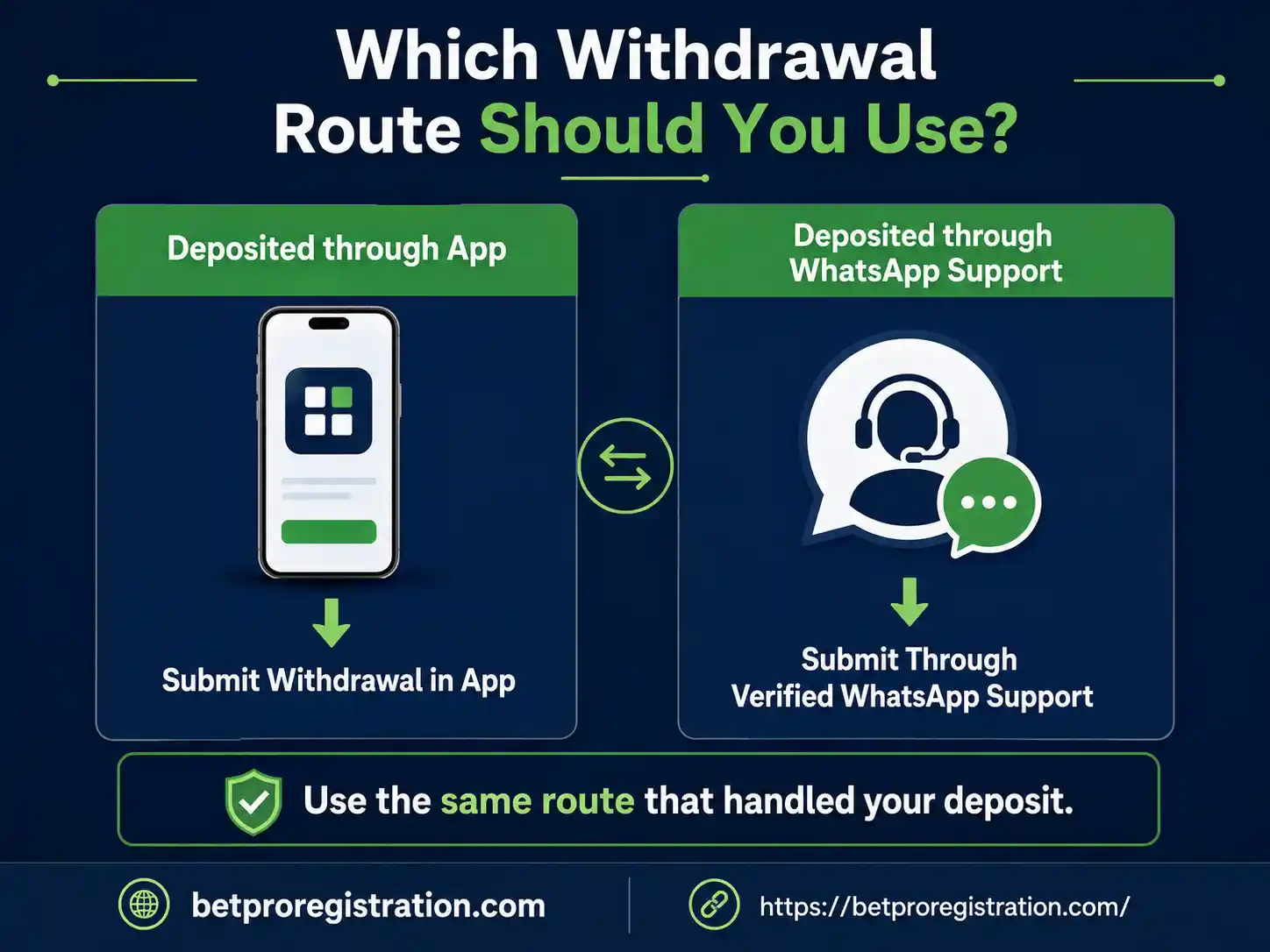
Choosing the correct route is the most important step in a Bed Pro withdrawal request.
If your deposit was submitted through the app, use the app for withdrawal. Open the dealer app, access the relevant withdrawal area, enter the requested payment information, and submit the request according to the current on-screen instructions. The interface may change as the app is updated, so follow the live fields rather than relying on an old screenshot as a permanent specification.
If your deposit was coordinated through WhatsApp, continue with authorized dealer WhatsApp support for the withdrawal. Prepare the withdrawal form details before opening the conversation. Sending a complete request in one message is easier for both the user and the support team than sending the username, amount, wallet name, and account number in separate messages over several minutes.
Do not use a random social-media number because it claims to offer faster withdrawal. Do not send payment details to a contact that approached you first unless you have independently verified that contact through BetProRegistration.com. The safest habit is to start from the verified support route published by the dealer website.
This same-route rule is also useful when a user has both the app and a WhatsApp conversation available. The existence of two service channels does not mean every request should be duplicated across both. Duplicate requests can create confusion. Use the channel associated with the original deposit unless the support team specifically instructs you to move the case.
Bed Pro Withdrawal Form: Details You Need
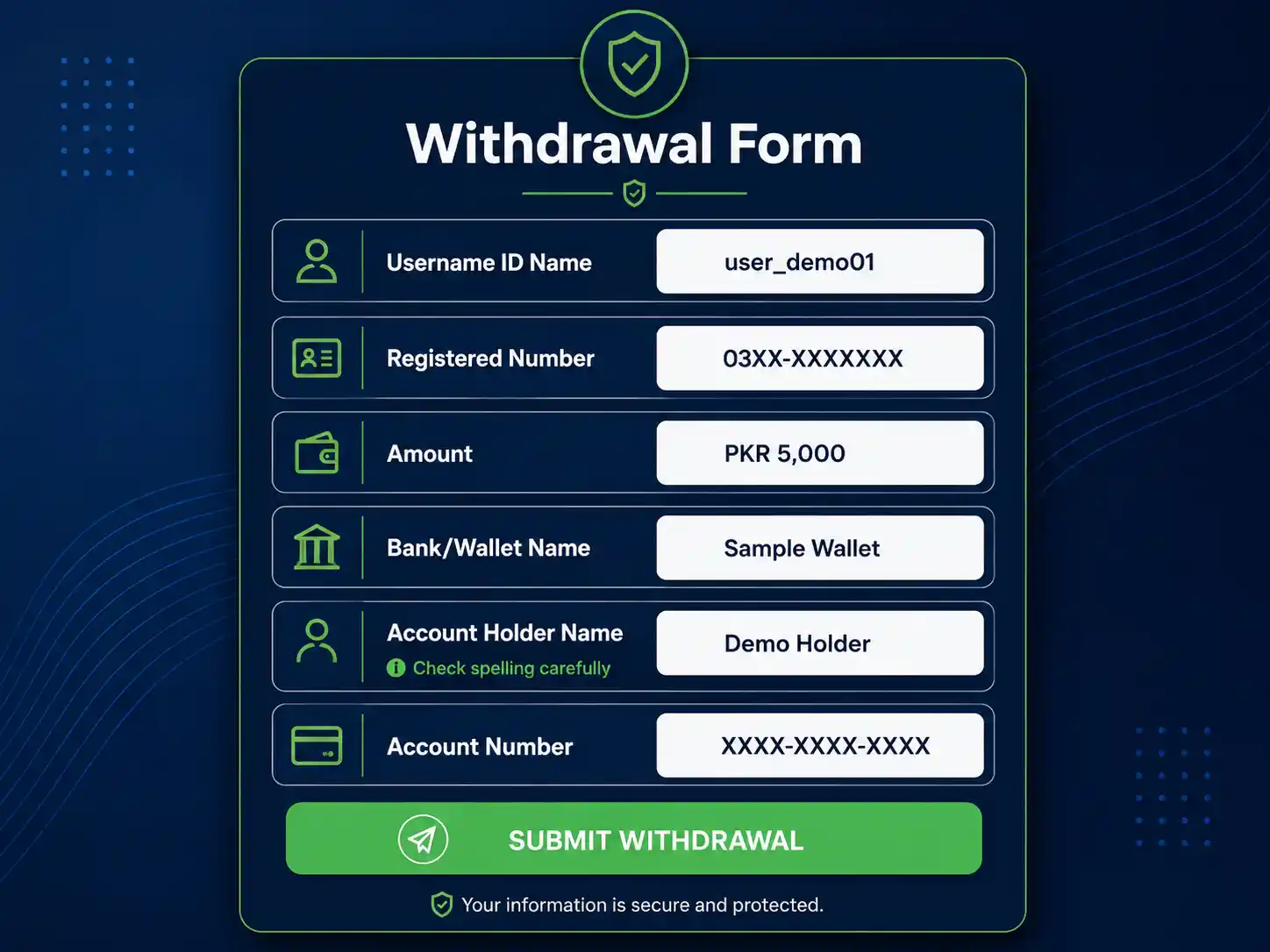
A complete Bed Pro withdrawal form normally contains six core pieces of information:
Username ID Name: the username or BetPro ID associated with the account.
Registered Number: the number connected with the account or dealer-service record.
Amount: the amount the user wants to withdraw.
Bank or Wallet Name: the destination method, such as JazzCash, Easypaisa, UPaisa, NayaPay, SadaPay, or bank transfer.
Account Holder Name: the name registered on the destination wallet or bank account.
Account Number: the destination wallet number or bank account number.
Users should prepare all six fields before submitting the request. This avoids the common situation where support has to ask several follow-up questions simply because one field was omitted.
The account-holder name deserves extra attention. Mismatched names are the most common withdrawal issue reported by the support process. Make sure the spelling and identity details entered in the request accurately match the destination payment account. If the user knowingly uses a different person’s wallet or bank account, support may need additional coordination before the request can proceed.
The account number should also be checked digit by digit. Mobile wallet numbers can look familiar enough that a user overlooks a transposed digit. Copying and pasting can reduce typing errors, but the user should still verify the final number before submission.
The withdrawal amount should be entered clearly and without ambiguous formatting. At the time of publication, the minimum Bed Pro withdrawal amount is Rs. 500. A user should confirm the available balance and current limit before sending the request rather than assuming an older threshold still applies.
How to Fill the Withdrawal Request Correctly
A well-prepared request reduces avoidable questions and gives the support team a clean set of details to review. Start by copying the username ID exactly as it appears on the account. Do not shorten it, add spaces, or substitute a nickname. Then enter the registered number connected with the account so support can match the request with the correct service record.
Next, enter the amount you want to withdraw. Use a clear figure such as “Rs. 5,000” rather than a vague message like “withdraw everything.” If you want to withdraw the full available amount, confirm the available balance first and enter the exact amount requested by the form.
For the bank or wallet field, write the payment method clearly. Examples include JazzCash, Easypaisa, UPaisa, NayaPay, SadaPay, or bank transfer. After that, enter the account-holder name exactly as it appears on the receiving wallet or bank account. This is the field that deserves the most attention because a name mismatch is the most common reason support needs extra coordination.
Finally, check the destination account number. Read it from beginning to end before submitting. If you copied the number from another app, make sure no extra spaces or missing digits were introduced. A correct Bed Pro withdrawal request should be complete enough that support can understand who is requesting funds, how much is being requested, and where the payment should be sent without asking for basic information again.
For WhatsApp-assisted users, keeping the six fields together in one message is especially useful. App users should follow the live form fields shown in the current app version. In either route, accuracy matters more than speed while entering the information. The goal is to submit once, submit clearly, and give support everything required for efficient processing.
Before sending, compare the form with your payment account one final time, especially the name and number, because those details determine where the withdrawal is coordinated.
Bed Pro Withdrawal Methods in Pakistan
Bed Pro withdrawal support can accommodate several common Pakistani payment routes. These include JazzCash, Easypaisa, UPaisa, NayaPay, SadaPay, and bank transfer. The purpose of listing these methods is to help users understand the kinds of destination details they may be asked to provide, not to suggest that every option is guaranteed to be available under every account condition.
For a mobile wallet, the user should provide the correct wallet name, account-holder name, and registered wallet number. For bank transfer, the support process may require the current bank details requested in the withdrawal workflow. Users should follow the live instructions rather than improvising payment information.
Payment method availability can change, and individual circumstances can differ. A wallet that worked for a previous request may not always be the preferred route at a later date. Confirm the current option in the app or with verified support before submitting sensitive payment details.
Users should also avoid sending funds or withdrawal information to numbers copied from comments, public groups, or unrelated websites. A withdrawal request contains enough personal and financial information that the destination contact should be verified first. This is one reason the dealer website should remain the starting point for support.
Minimum Bed Pro Withdrawal and Typical Time
At the time of publication, the minimum deposit and minimum Bed Pro withdrawal amount are both Rs. 500. This provides a clear reference for users considering a smaller request, but the limit should be confirmed at the time of use because operational requirements can change.
Correctly submitted withdrawal requests are commonly handled in around 3 to 5 minutes. That timing works best when the username, registered number, amount, destination method, account-holder name, and account number are accurate and when no additional verification is needed.
The 3-to-5-minute figure should not be interpreted as a guaranteed deadline. A mismatch can extend the process. A typo in the payment number can require correction. A user may also need to respond to a support question before the request can be completed. In those situations, the best way to speed up the process is not to send repeated messages. It is to provide the requested clarification clearly.
Users should be cautious of anyone promising an unrealistic instant withdrawal in exchange for a separate fee or asking for a password or one-time code. Speed should never be used as a reason to bypass verification or send sensitive account credentials.
What a Completed Bed Pro Withdrawal Looks Like
A completed withdrawal record can show the client name, BetPro username ID, registered number, amount, bank or wallet, account-holder name, account number, date, time, request status, and payment proof. The real completed-withdrawal screenshot supplied for this guide demonstrates that structure and gives users a concrete example of what a processed request can look like.
Before publishing a real screenshot, personally identifying information should be masked. The client name, username ID, registered phone number, account-holder name, wallet or bank account number, transaction identifiers, receipt references, and any scannable QR codes should be blurred or replaced. The educational value comes from showing the layout, completion status, and proof structure, not from exposing another user’s details.
A properly redacted example is more valuable than a decorative stock image because it reflects the real dealer process. It shows users which fields matter and what type of confirmation may be associated with a completed request. It also supports trust without requiring exaggerated claims.
The screenshot should sit close to the section explaining completed requests, with descriptive alt text such as “Completed Bed Pro withdrawal details and payment proof example.” That description tells both users and search systems what the image represents without stuffing unrelated keywords.
Common Bed Pro Withdrawal Problems
Mismatched Account-Holder Name
A mismatched name is the most common issue. The destination wallet or bank account may use a name that differs from the information submitted in the withdrawal request. Support may then need to confirm the details with the user.
The fix is straightforward: check the destination account-holder name before submission. If there is a legitimate difference, explain it clearly when support asks rather than repeatedly resubmitting the same form.
Wrong Wallet or Account Number
One incorrect digit can stop an otherwise valid withdrawal request. Verify the number before pressing submit or sending the form. If support notices a problem, provide the corrected number in one clear reply.
Incomplete Withdrawal Form
Missing the registered number, wallet name, or account-holder name creates unnecessary delay. Prepare the full form first. Users who use WhatsApp can copy the withdrawal form structure, fill every field, then send the complete request together.
Using the Wrong Service Route
An app-deposit user who tries to start a separate WhatsApp withdrawal may create confusion, and the reverse can also happen. Follow the same-route rule: app deposit means app withdrawal; WhatsApp deposit means WhatsApp withdrawal.
Duplicate Requests
Submitting the same request through multiple channels does not necessarily make it faster. It can make coordination harder. Send one complete request through the correct route, then respond to support if clarification is needed.
Impatience During Coordination
A request taking longer than the typical range does not automatically mean it failed. Check whether support asked for corrected information. A mismatched name or incorrect payment detail can require additional coordination. Clear replies are more useful than repeated status messages.
Bed Pro Withdrawal Safety Checklist
Before submitting a Bed Pro withdrawal, confirm that you are using the dealer-service route associated with your deposit. If you deposited through the app, remain in the app. If you deposited through WhatsApp, begin from authorized dealer WhatsApp support.
Check that the username ID belongs to the correct account. Confirm the registered number. Review the withdrawal amount and make sure it meets the current minimum. Select the correct bank or wallet name. Match the account-holder name accurately. Check the destination number one final time.
Never provide your account password or one-time verification code simply because someone claims it is needed to speed up a withdrawal. Do not follow payment instructions sent by an unverified person who contacted you first. Start from the dealer website or app and verify the route before sharing account-related information.
Keep a record of the request until it is completed. If the app provides a status screen, retain it temporarily. If the request is handled through WhatsApp, keep the relevant conversation until the payment is confirmed. This gives support useful context if a follow-up is required.
For users who are unsure which account identifier they should use, the BetPro ID Pakistan guide explains the role of the BetPro ID. That page should handle ID-specific questions, while this page remains focused on withdrawal.
Bed Pro Withdrawal: Timing, Accuracy and Support
A fast Bed Pro withdrawal process still depends on correct information. The trade-off is that a user may spend an extra minute checking details before submission, but that small effort can prevent a longer delay caused by a mismatched name or wrong destination number.
The app offers a structured self-service route for users who already deposited through the app. WhatsApp offers human coordination for users whose deposit journey was handled through dealer support. Neither route needs to replace the other. The correct route is the one tied to the user’s existing service flow.
Multiple payment methods provide flexibility, but they also create more opportunities for mistakes. A user must select the right wallet or bank and enter the correct account information. The presence of several supported methods does not remove the need to confirm the current option before submitting the request.
The typical 3-to-5-minute handling time is useful guidance, but presenting it as an absolute guarantee would be misleading. Accurate details, support availability, payment verification, and any required clarification can affect the final time. A trustworthy guide should explain the normal experience without promising that every case will finish at the same minute.
There is also a privacy trade-off when showing real payment proof. Real examples build confidence, but real personal data should never be exposed merely to make a screenshot look authentic. Redaction preserves the educational value while protecting the user represented in the image.
Bed Pro Withdrawal: What to Do Next
If you are ready to submit a Bed Pro withdrawal, first identify your deposit route. App users should open the app and use the current withdrawal workflow. WhatsApp-assisted users should open the verified WhatsApp support route from BetProRegistration.com.
Prepare the withdrawal form before starting. Have your username ID name, registered number, withdrawal amount, bank or wallet name, account-holder name, and destination account number ready. Check the spelling of the account-holder name carefully because mismatched names are the most common support issue.
Confirm that the requested amount meets the current minimum. At the time of publication, the minimum withdrawal is Rs. 500. If you are unsure whether the limit or payment method has changed, confirm the current requirement before submitting the request.
After submission, allow the request to be processed. Correct requests are commonly handled within around 3 to 5 minutes, but cases requiring clarification can take longer. If support asks a question, answer the specific issue rather than sending a duplicate withdrawal form through another channel.
For general account information, visit the main Bed Pro guide. If you cannot access the account, use the Bed Pro login guide. If the problem is identifying or understanding your BetPro ID, use the BetPro ID Pakistan resource. Those pages each own a different intent, while this article remains the dedicated withdrawal guide.
References
This guide is based on the current Bed Pro dealer-support workflow supplied by BetProRegistration.com in August 2026, including the withdrawal request form, current minimum amount, typical processing range, supported payment methods, route-selection rule, common mismatched-name issue, and a real completed-withdrawal example.
For related on-site information, see the Bed Pro pillar guide, the Bed Pro login support page, and the BetPro ID Pakistan guide.
FAQs
What is the minimum Bed Pro withdrawal in Pakistan?
At the time of publication, the minimum Bed Pro withdrawal is Rs. 500. Operational limits can change, so confirm the current amount in the app or through verified dealer support before submitting a request.
How long does a Bed Pro withdrawal take?
Correctly submitted requests are commonly handled in around 3 to 5 minutes. A mismatched account-holder name, incorrect destination number, incomplete form, or additional verification can make the process take longer.
Should I withdraw through the app or WhatsApp?
Use the same route that handled your deposit. If you deposited through the app, submit the withdrawal in the app. If your deposit was handled through WhatsApp, submit the request through verified WhatsApp support.
Conclusion
Ready to submit your Bed Pro withdrawal? Use the same dealer-service route that handled your deposit, prepare all six withdrawal fields, and double-check the account-holder name and destination number before submitting. App users should continue in the app. WhatsApp-assisted users can contact verified WhatsApp support for human coordination. If you need broader account information first, visit the Bed Pro guide or the Bed Pro login page for access help.