
BPexch Account Pakistan: Safe Powerful New User Guide
TL;DR: Do You Need a New BPexch Account?
A BPexch account is the player access you use with BetPro/BPexch. For new users in Pakistan, the important question is not which domain name you saw first. It is whether you already have a working BetPro ID or genuinely need a BPexch account. BetProRegistration.com operates as an authorized BetPro dealer service and currently supports two onboarding routes: verified WhatsApp-assisted service and the BetProRegistration dealer app.
If you do not yet have a BetPro ID, you can move into the current registration process through the BPexch Registration guide or BetPro Sign Up. Under the current dealer workflow, the required signup steps and initial deposit are completed before the BetPro ID is issued. The current minimum deposit is Rs. 500, although live service instructions should take priority if an operational limit later changes.
If you already have a working BetPro ID, do not create another BPexch account simply because you encounter a different BetPro/BPexch domain label. In particular, BPexch Pro is another BetPro domain/TLD route, not a separate “Pro account” tier. A different domain label is not evidence that a second account is required.
Context: What a BPexch Account Means
Search results and third-party pages often use the words account, ID, login, exchange, app, and registration as though they are separate products. That can make a first-time user believe they need several registrations. In the current BetProRegistration workflow, the practical model is simpler: the user completes onboarding, the required initial deposit step is handled, and a BetPro ID is issued for access.
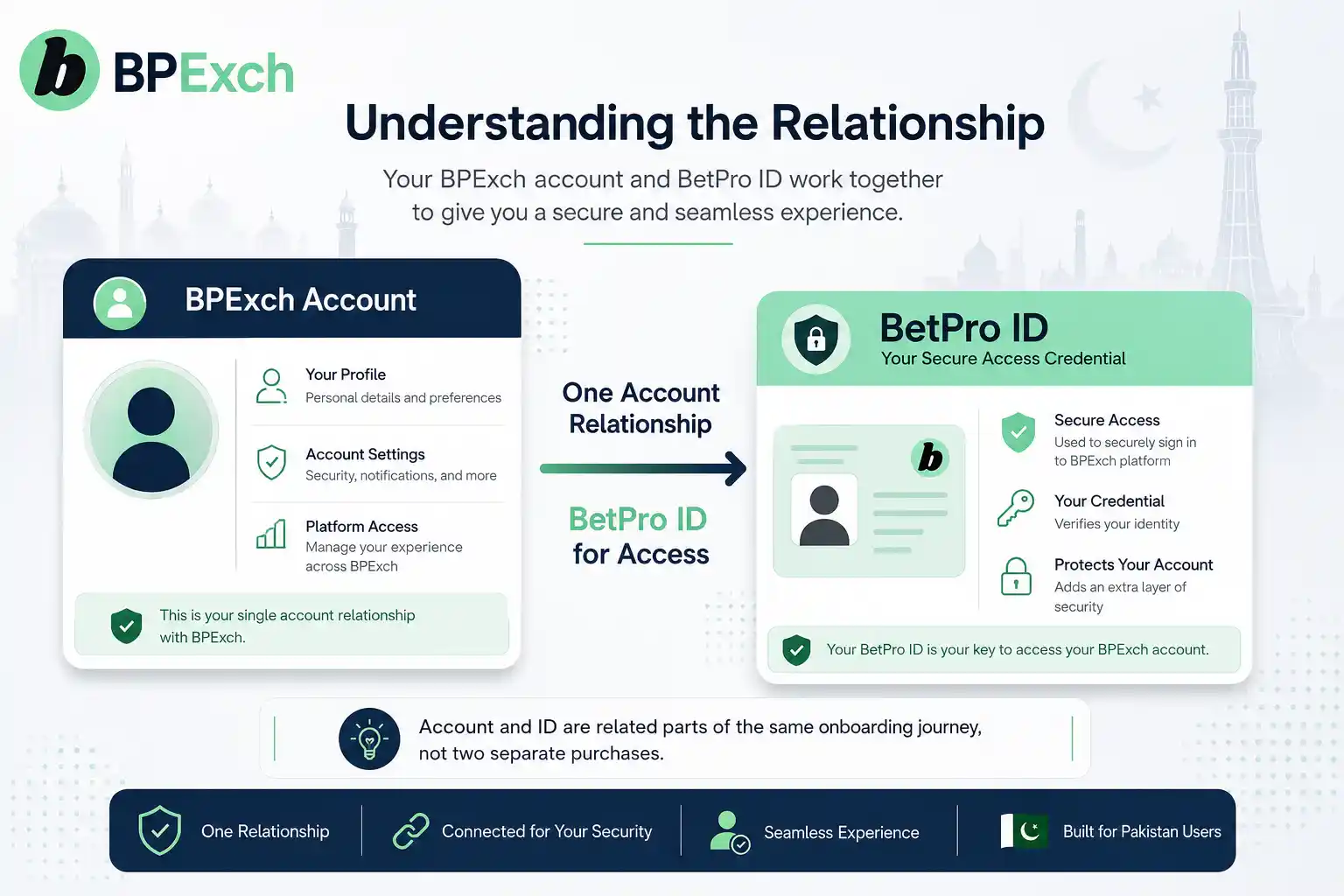
A BPexch account should therefore be understood as the user’s account relationship with the BetPro/BPexch platform, while the BetPro ID is the credential used to access that account. BetProRegistration.com is the authorized dealer service that helps users complete onboarding and provides ongoing account support. The dealer app is a service route; it is not a separate BetPro platform account.
This distinction matters commercially and operationally. A new user needs a clear path to become a customer without being sent through several overlapping signup pages. An existing user needs to recognize that a new domain, app screen, or support contact does not automatically mean a new BPexch account should be created.
The cleanest rule is: identify whether you are new or existing before doing anything else. If you have never received a BetPro ID, follow the new-user onboarding route. If you already have credentials, use login or troubleshooting guidance first. If you are unsure, verify the account status with the maintained dealer-support route before repeating registration.
What Works: The BPexch Account Decision Path
A useful BPexch account guide should answer a decision, not repeat every registration step. The decision can be handled in three stages: determine whether an account already exists, choose the correct route if you genuinely need a BPexch account, and preserve the same service history after onboarding.
Start by asking whether you already received a BetPro ID or username/password pair. If the answer is yes, treat yourself as an existing user unless verified support confirms otherwise. If the answer is no and you have not completed the current signup and initial-deposit process, you are likely in the new-user path.
Next, choose either human-assisted WhatsApp onboarding or the dealer app. Do not begin both routes simultaneously. A single clear route gives support a cleaner history and reduces the chance of duplicate records, repeated payments, or confusion over which information was submitted.
Finally, keep your account-service route understandable. App-handled deposits later use the app withdrawal route. WhatsApp-routed deposits later use WhatsApp for the withdrawal request. This is not part of account creation itself, but understanding the rule early helps a new BPexch account user choose a route they are comfortable continuing with.
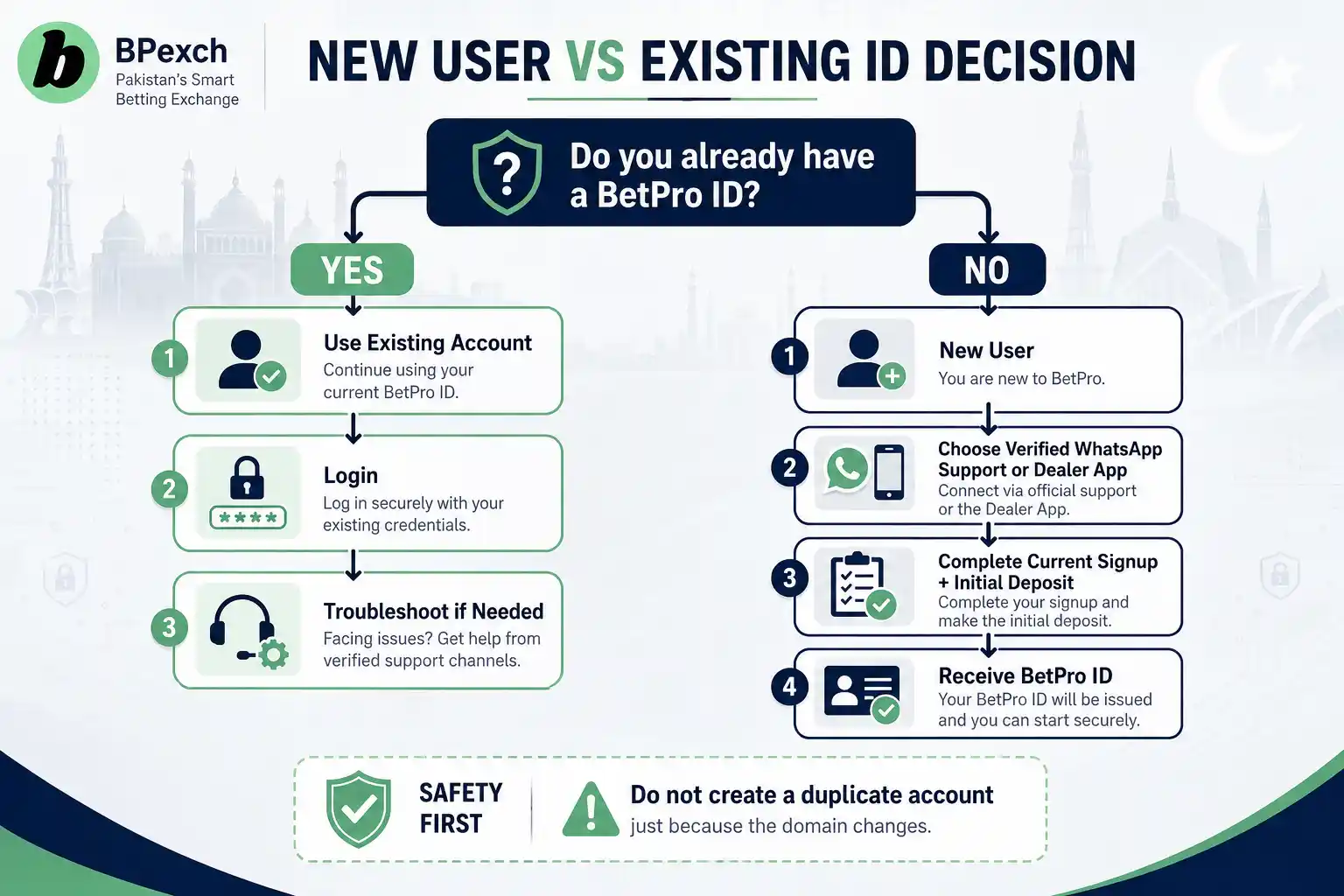
Do I Need a BPexch Account If I Already Have a BetPro ID?
If you already have a valid BetPro ID, the first step should be to use that existing credential rather than create a new BPexch account. A BetPro ID represents the access credential for the platform account. Creating another account because the website label looks different can make account history harder to understand.
The most important example is BPexch Pro. BPexch Pro is another BetPro domain/TLD route, not a separate premium or upgraded account type. A user should not register again merely because “Pro” appears in the domain name. Treat it as a route to the same BetPro ecosystem rather than evidence of a second product.
If an existing BetPro ID does not work at the route you are trying to use, troubleshoot the access problem first. Use the BetPro Login guide for normal access questions or BetPro ID Not Working when the credential exists but access fails.
Do not create a fresh BPexch account as the default response to a forgotten password, expired session, wrong domain, app issue, or typing mistake. Those are access or troubleshooting problems until evidence shows that a genuine BPexch account is needed.
When Should a New User Create a BPexch Account?
A genuinely new user is someone who does not already have a usable BetPro ID and intends to begin the current onboarding process. In that situation, moving toward a BPexch account is appropriate because the user is entering the platform relationship for the first time.
The current dealer process offers two routes. The first is verified WhatsApp-assisted onboarding with human support. The second is the BetProRegistration online dealer app. Both routes lead toward the same practical outcome: completion of the required signup information and initial-deposit step before the BetPro ID is issued.
A new BPexch account should be created with accurate information. Do not intentionally change names, phone numbers, or other details simply to force a second signup through a different route. Accurate onboarding information makes later account, deposit, withdrawal, and support conversations easier to reconcile.
If you are ready to register rather than compare account terminology, move to the BPexch Registration guide. That page owns the full BPexch registration process. This article remains focused on deciding whether you need a new account at all.
BPexch Account Registration Through WhatsApp Support
WhatsApp-assisted onboarding is the human-service option for a new BPexch account. It is useful for users who prefer to have a person coordinate the current signup and payment instructions rather than complete the dealer-app fields independently.
Start from verified WhatsApp support linked from BetProRegistration.com. Do not choose a dealer number from a random comment, copied social profile, forwarded screenshot, or unrelated website simply because the person claims to provide BPexch access.
Tell support that you are a new user and want to begin onboarding. Follow the current instructions, provide only the account information required for the process, and confirm payment details before sending the required initial deposit. The current minimum deposit is Rs. 500.
Never send your existing banking password, wallet PIN, OTP, email password, or remote-access code to create a BPexch account. The dealer may need relevant signup information and transaction evidence, but financial-account control credentials should remain private.
BPexch Account Registration Through the Dealer App
The BetProRegistration dealer app provides the self-service onboarding route. The current registration flow can request information such as name, username, phone or WhatsApp number, password, OTP verification, and an optional email address. Live form fields are the final reference because operational screens can change.
For a new BPexch account, enter information carefully and use a phone number you control. Protect the password you create and enter OTP codes only in the legitimate verification flow you intentionally opened. Do not send the password or OTP to someone in a chat.
After the required signup details are completed, follow the current initial-deposit instructions in the same route. Under the current dealer workflow, the BetPro ID is issued after the required signup and deposit steps are completed.
For general app information, use the BPexch App guide. For Android download, installation, APK, or update questions, use the BetProExch App Download guide. Those pages own software questions; this page owns the new-account decision.
BPexch Account vs BetPro ID: What Is the Difference?
The easiest way to understand the relationship is to separate the account from the credential. The BPexch account is the user’s account relationship with the platform. The BetPro ID is the credential used to access it. Users often search both phrases because the terms appear together during registration, login, and support.
This means a user should not think of “getting a BetPro ID” and “opening a BPexch account” as two unrelated purchases or registrations. In the current dealer workflow, the onboarding process results in the user receiving the BetPro ID needed for platform access.
The dedicated BetPro ID Pakistan page explains the credential itself in more detail. Use that page when your question is specifically about what the ID is, how it is issued, or how it is used. Use this BPexch account guide when the question is whether a new account relationship is required.
BPexch Account and BPexch Pro: One Account or Two?
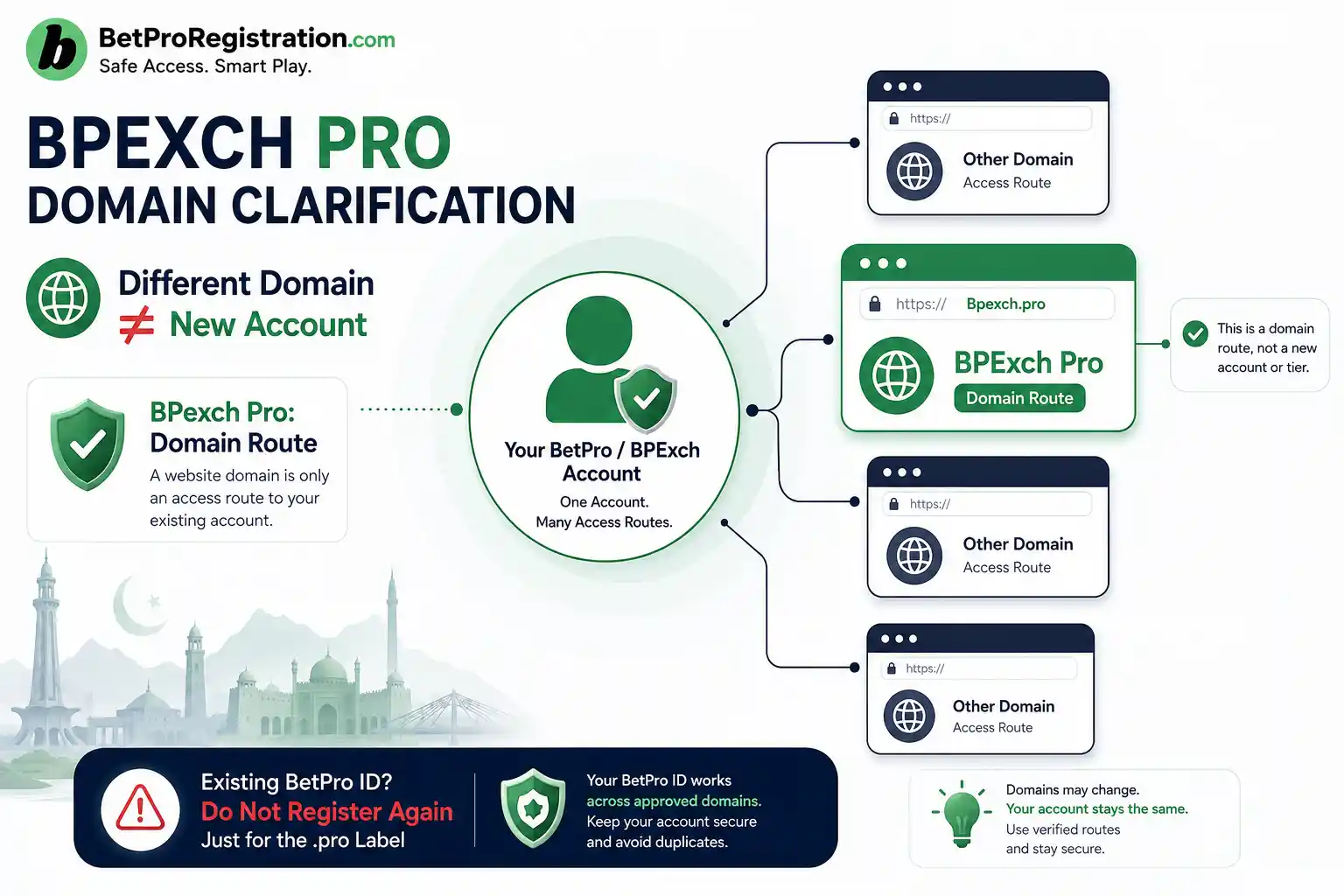
BPexch Pro should not be treated as a special account tier. It is another BetPro domain/TLD route. Therefore a user who sees a BPexch Pro address should not assume that “Pro” requires a second BPexch account, an upgrade fee, different eligibility, or a separate BetPro ID.
This is an important correction because keyword tools show searches such as “bpexch pro sign up.” Search demand does not prove that a separate Pro product exists. It can simply reflect users trying to reach the platform through a particular domain label.
If you are a new user with no BetPro ID, use the normal verified onboarding route. If you already have a BetPro ID, try the appropriate verified access route or ask dealer support for guidance. Do not create a second account solely because a domain uses the .pro label.
The same principle applies whenever a domain label is the only thing that changed. Before starting a new BPexch account, confirm whether you are actually looking at a different product or simply another route to the same platform. Domain wording alone is not enough to justify duplicate registration.
What Information Should a New BPexch Account User Prepare?
Preparation depends on the route. For WhatsApp-assisted onboarding, have an active WhatsApp number and accurate details available for the current support process. For the dealer app, be ready to complete the live registration fields and receive OTP verification on the registered number when requested.
The app flow can currently include a name, username, phone or WhatsApp number, password, OTP verification, and an optional email address. Do not treat this list as a permanent technical specification. The live form should take priority if fields change later.
A new BPexch account user should also be ready for the required initial deposit step. The current minimum deposit is Rs. 500. Payment methods can include JazzCash, Easypaisa, UPaisa, NayaPay, SadaPay, bank transfer, and other methods currently offered through the service route.
Do not save a receiving account from an old screenshot and assume it will remain valid. Verify the current payment destination when you are ready to pay. The BPexch Deposit guide covers the payment process in detail.
How to Avoid Creating a Duplicate BPexch Account
Duplicate registrations usually begin with uncertainty. A user forgets which phone number was used, cannot log in, sees another domain, or receives conflicting advice and decides that a fresh BPexch account will be easier. That shortcut can create a more complicated support history.
Before registering again, search your own records for the BetPro ID, username, registered phone number, previous support conversation, app activity, or deposit receipt. If those records show an existing account, use the login or troubleshooting path first.
If you are uncertain whether the old account is still usable, contact verified dealer support and explain what you know. Provide the relevant account identifier and registered number if available. Do not send passwords or OTPs merely to prove ownership.
Create a new BPexch account only when you genuinely need a new onboarding process and the verified service route confirms that this is the correct action. A different domain, forgotten password, or app reinstall does not automatically meet that standard.
What If My Existing BPexch Account Will Not Log In?
A login failure is not a registration signal. If an existing BPexch account stops accepting credentials, treat the problem as access troubleshooting first. Check the username, password, current route, device, and whether you are using the correct app or website.
Use the BetPro Login guide for normal login and access steps. If the BetPro ID itself appears invalid or no longer works as expected, use BetPro ID Not Working.
Do not send repeated registration forms as a password-reset method. The current dealer app has its own password-recovery flow using the registered phone or WhatsApp number and OTP verification before a new password can be set.
Keeping login and registration separate protects the BPexch account history. It also gives support a clearer problem to solve: either restore access to the existing account or, only when appropriate, guide the user into a genuine new-account process.
How to Verify the Dealer Route Before Opening an Account
A prospective user is closest to conversion when they are ready to share signup details or make the required initial deposit. That is also the moment when verification matters most. Start from BetProRegistration.com and use the dealer app or the published support route.
Do not trust a contact because it uses a familiar logo, says “official,” or knows the word BPexch. Impersonators can copy names and images. A BPexch account should be started only through a route you can trace back to the dealer website you intended to use.
For WhatsApp assistance, open authorized dealer WhatsApp support from BetProRegistration.com. Ask questions before sending money if a payment instruction is unclear. A legitimate support interaction should not require your banking password, wallet PIN, or an OTP that gives someone control of another account.
If a contact promises guaranteed winnings, guaranteed income, or a special account tier that does not match the current dealer model, stop and verify the claim. Search demand or a domain label does not create a new BPexch account product.
Common BPexch Account Mistakes Before Signup
Assuming Every Domain Requires a New Account
A different domain label can look like a different service. BPexch Pro is a clear example: it is another BetPro domain/TLD route, not a separate Pro-tier account. Existing users should not create another BPexch account merely because they encounter that label.
Using Registration to Fix Login Problems
If you already have a BetPro ID, a login problem belongs to access troubleshooting. Creating another BPexch account can complicate account history instead of fixing the original password, app, or route issue.
Starting WhatsApp and App Registration at the Same Time
Choose one onboarding route and complete it consistently. Parallel registration attempts can create uncertainty about which details, payment instructions, or support conversation belong to the intended BPexch account.
Sending Money to an Old Payment Number
Payment destinations can change. Confirm the current recipient through the same verified service route before making the required initial deposit. An old screenshot is not a permanent payment instruction.
Sharing Passwords, OTPs, or Wallet PINs
Keep credentials private. Registration may require a password and OTP inside the legitimate app flow, but that does not mean you should send those credentials to an unknown person through chat.
Believing a “Pro” Label Means Better Account Benefits
Do not infer special limits, priority support, higher bonuses, or different eligibility from the BPexch Pro domain label. The current factual position is that it is another BetPro domain/TLD route, not a separate account tier.
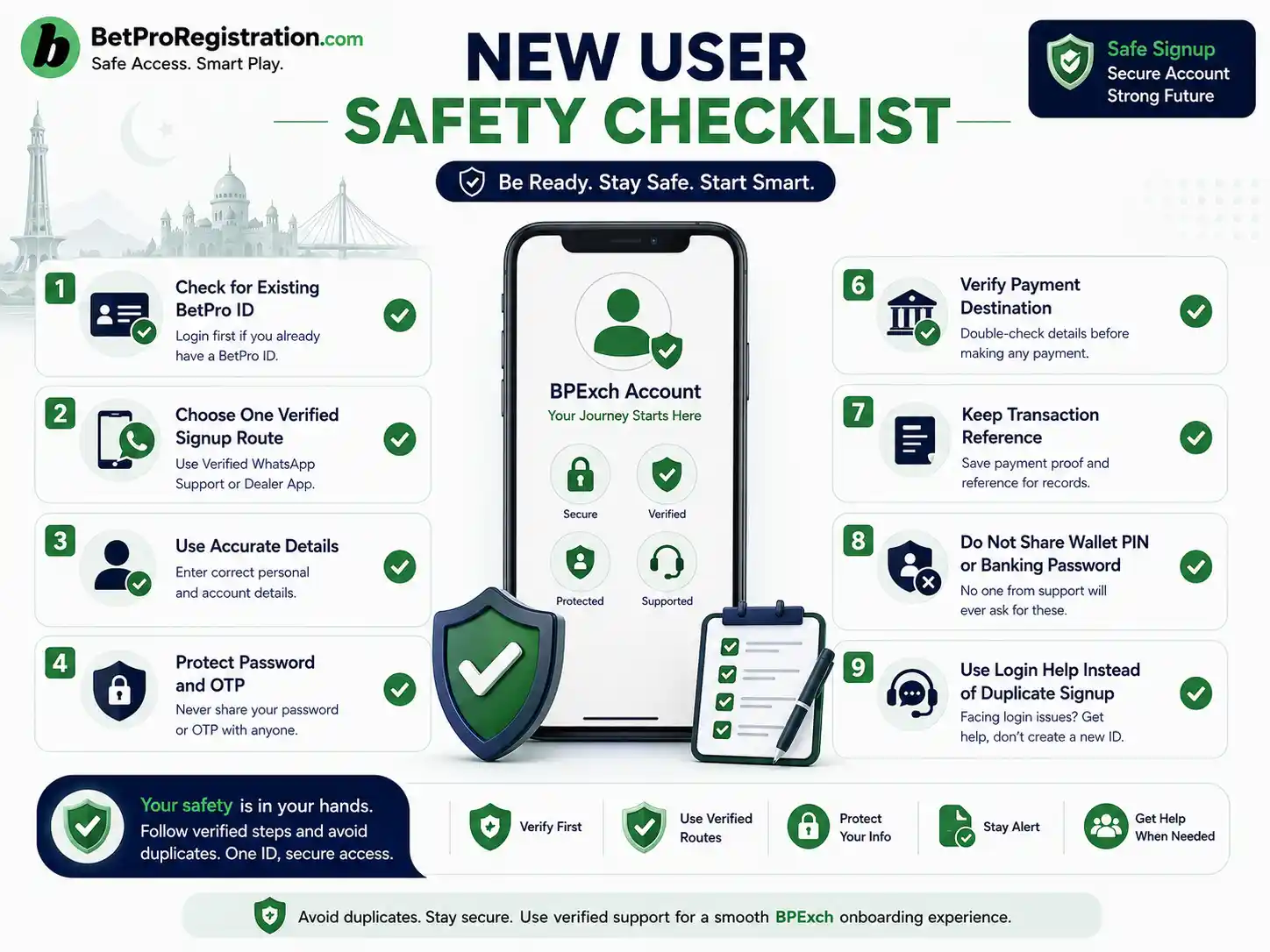
BPexch Account New-User Checklist
- Confirm that you do not already have a working BetPro ID.
- If credentials exist, troubleshoot access before registering again.
- Understand that BPexch Pro is another BetPro domain/TLD route, not a separate Pro account.
- Choose one onboarding route: verified WhatsApp support or the dealer app.
- Use accurate signup information and a phone number you control.
- Protect your password and OTP.
- Be ready for the required initial-deposit step before BetPro ID issuance.
- Remember the current minimum deposit is Rs. 500.
- Verify the current payment destination before sending funds.
- Keep the transaction reference privately.
- Do not share wallet PINs, banking passwords, email passwords, or remote-access codes.
- Keep app-funded transactions on the app service route.
- Keep WhatsApp-routed transactions on the verified WhatsApp service route.
- Use the registration owner for full signup instructions rather than combining several tutorials.
- Use login or ID troubleshooting when an existing account cannot be accessed.
- Review the Responsible Gambling guidance before using funds for betting.
Trade-offs: Account Convenience vs a Clean Service History
WhatsApp-assisted onboarding offers direct human coordination. That is useful when a new user wants clarification before submitting details or sending the initial deposit. The trade-off is that messaging contacts must be verified carefully because impersonation is easy on public messaging platforms.
The dealer app offers self-service convenience and a structured registration flow. The trade-off is that the user must protect the registered phone, password, OTP, and app source. A user who installs an unknown APK or shares verification codes can undermine the convenience of self-service.
Using an existing BetPro ID can be simpler than opening a new BPexch account, but only when the credential actually belongs to you and remains usable. If account ownership or access is uncertain, verified support should clarify the status before you proceed.
Finally, using a different domain can be convenient when platform routes change, but the domain name should not redefine the account model. BPexch Pro is a route label, not proof of a separate Pro membership. Keeping that distinction clear prevents keyword-driven misinformation from becoming operational advice.
Next Steps: Choose the Correct Account Route
If you have never received a BetPro ID and want to become a customer, move from this decision guide to the BPexch Registration guide or BetPro Sign Up. Choose either verified WhatsApp-assisted onboarding or the current dealer app and follow that route consistently.
If you already have a BetPro ID, do not open another BPexch account simply because you reached a new domain. Use the existing login route first. BPexch Pro does not require a separate Pro account because it is another BetPro domain/TLD route.
If you started onboarding but did not receive an ID, return to the original route and determine whether registration, OTP verification, or the required initial deposit is still incomplete. Do not create several parallel attempts while the first one is unresolved.
If you cannot determine whether you are a new or existing user, contact verified dealer support from BetProRegistration.com. Explain the account history you know, but keep passwords, OTPs, wallet PINs, and banking passwords private.
References and Current Process Notes
This BPexch account guide is based on the current BetProRegistration authorized-dealer workflow documented for Pakistan in September 2026: two onboarding routes, signup plus required initial deposit before BetPro ID issuance, Rs. 500 current minimum deposit, app/WhatsApp service-route continuity, and 24/7 human dealer support.
The article also incorporates the confirmed clarification that BPexch Pro is another BetPro domain/TLD route rather than a separate Pro account tier. Therefore Pro-labelled signup searches should be routed into the existing BPexch registration/account model instead of being treated as evidence of a distinct product.
Current operational instructions can change. The live BetProRegistration app and verified dealer-support route should take priority over outdated screenshots, copied payment numbers, old social posts, or third-party pages that claim unsupported account types, fixed registration times, guaranteed bonuses, or special tiers.
Do I need a new BPexch account if I already have a BetPro ID?
Usually, no. If you already have a valid BetPro ID, use the existing credential and troubleshoot access if necessary. Do not create another account merely because you see a different BetPro/BPexch domain.
Is BPexch Pro a separate Pro account?
No. BPexch Pro is another BetPro domain/TLD route, not a separate premium account type. A Pro-labelled domain does not by itself require another registration, BetPro ID, upgrade fee, or special account.
How can a new user open a BPexch account in Pakistan?
A genuinely new user can follow verified WhatsApp-assisted onboarding or the current BetProRegistration dealer app. Complete the required signup information and initial-deposit step through one verified route, after which the BetPro ID is issued under the current dealer workflow.
Conclusion
Start with clarity. Ready to open a BPexch account for the first time? Confirm that you do not already have a BetPro ID, choose one verified onboarding route, and continue to the BPexch Registration guide or authorized dealer WhatsApp support. If you already have credentials, protect your existing account and solve the access problem before creating anything new.