
BPexch Wallet Pakistan: Powerful Safe App Guide 2026
TL;DR
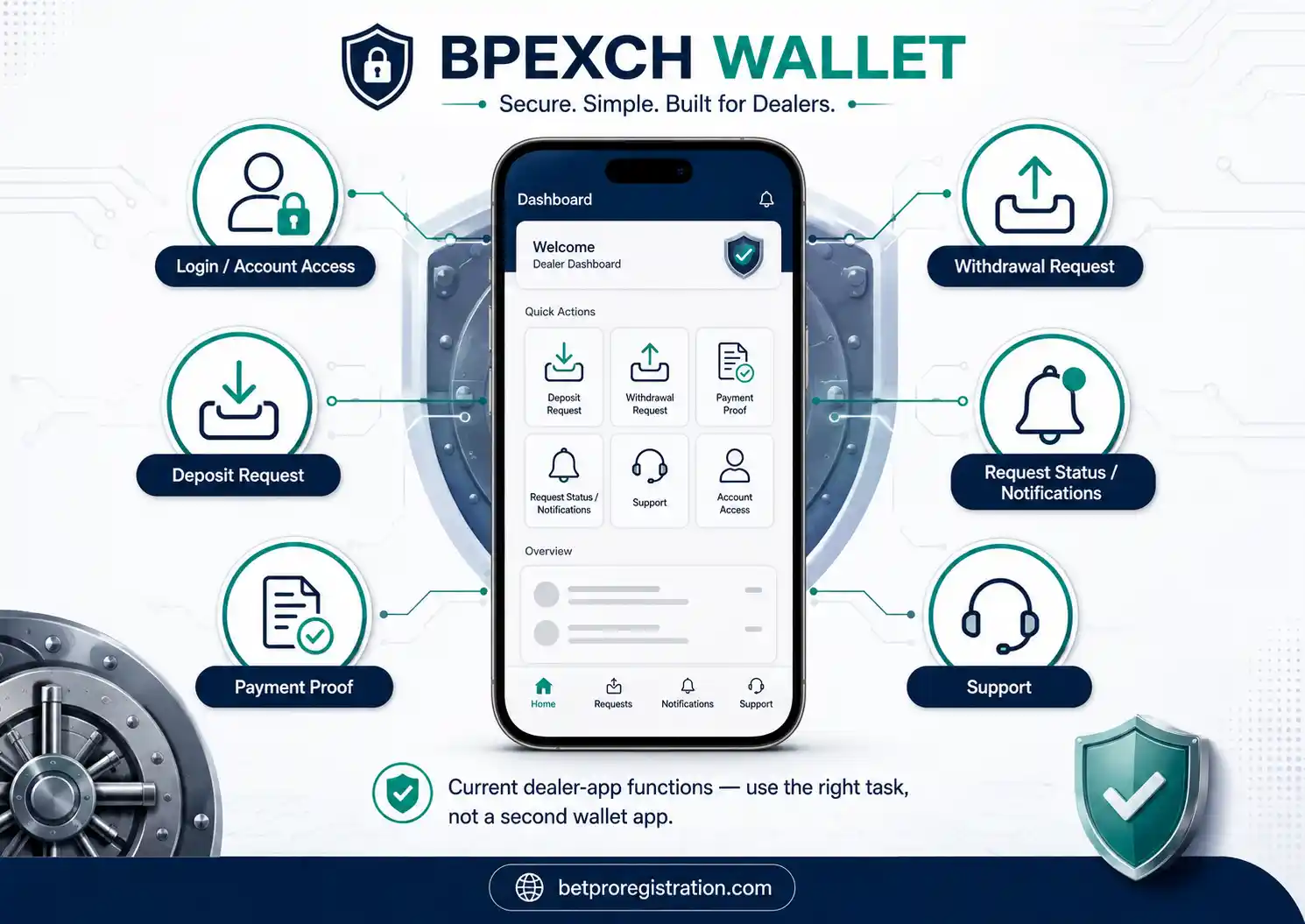
A BPexch Wallet search usually points to the wallet-like account-service functions available through the current BetProRegistration dealer app. The live Android download page currently brands that app as BetPro Vault. It supports login or registration, deposit requests, withdrawal requests, payment-proof viewing, account updates, push notifications, and support access. It is not a separate betting platform, bank wallet, or second BetPro account.
Use the app whenever a wallet search result makes route selection unclear.
If you already use the dealer app, do not install a different BPexch Wallet APK from an unknown site. Use the maintained route published by BetProRegistration.com. For Android installation, APK, version, or update questions, use the BetProExch App Download guide. For broad mobile-app information, use the BPexch App guide.
A wallet-style service query commonly reflects a practical task: open the dashboard, log in, start a deposit request, submit a withdrawal request, view payment proof, check request status, or download the current Android app. This page explains that wallet-style task layer and sends deeper jobs to their existing specialist pages so users do not create duplicate accounts or install competing APK files.
The current minimum deposit and withdrawal through the dealer service is Rs. 500. App-routed deposits should later use the app withdrawal route. WhatsApp-routed deposits should later use WhatsApp for the withdrawal request. Correctly submitted withdrawals are commonly handled around 3–5 minutes in the current dealer workflow, but additional verification, payment-service delays, or mismatched details can take longer.
What Users Mean by BPexch Wallet
People commonly search for BPexch Wallet and related searches such as wallet app, wallet login, wallet download, wallet sign up, and wallet withdrawal. The wording can make the term sound like a separate financial product. On this site, that would be misleading.
BetPro is the platform users ultimately access with their BetPro ID. BetProRegistration.com operates as an authorized BetPro dealer service. Its current Android dealer app is branded BetPro Vault on the live download page and provides wallet-like service functions including deposit and withdrawal requests, payment-proof viewing, request updates, push notifications, login or registration, and support access.
For this guide, BPexch Wallet is therefore a user-facing search label for those dealer-app functions. It is not presented as a bank, e-money institution, cryptocurrency wallet, or independent stored-value account. Users should not expect a separate wallet registration, wallet balance product, or different wallet APK outside the maintained dealer-app ecosystem.
This distinction also protects the site’s architecture. The BPexch App page remains the general app guide. The BetProExch App Download page remains the Android APK guide. Deposit and withdrawal pages remain the transaction guides. BPexch Wallet explains the wallet-style dashboard and connects users with the right function.
Using the Dealer App Dashboard
The cleanest way to use BPexch Wallet is to think in tasks rather than product labels. Open the current BetProRegistration dealer app, identify what you need to do, and stay within the verified service route for that task.
New users can start onboarding through the app or verified WhatsApp support. Existing users can log in and use the current dashboard functions. Deposit users can submit a request and payment evidence through the app route. Withdrawal users can submit payout details through the same app route when the related deposit was app-routed.
The live Android download page currently describes deposit requests, withdrawal requests, payment-proof viewing, account updates, push notifications, login or registration, and support access. The main app-download guide also documents signup, login, dashboard, deposit status, withdrawal status, push notifications, in-app notifications, and BetPro Exchange access.
Those functions explain why people may search for BPexch Wallet even though the maintained Android app is currently called BetPro Vault. The safest response is to map the user’s task to the existing app function instead of sending them to a second wallet application.
BPexch Wallet App: Which App Should You Use?
If you search for a BPexch Wallet app, use the current BetProRegistration dealer-app route rather than downloading a separate application from an unknown site. The maintained Android download page currently presents the app as BetPro Vault.
The app does not replace the BetPro platform. It is the dealer-service layer used for onboarding and ongoing requests. After the required signup and initial-deposit steps are completed, the user receives a BetPro ID for use on the BetPro platform.
For general mobile information, use the BPexch App guide. That page explains the app entity and mobile-access intent. This BPexch Wallet guide stays focused on what the wallet-like dashboard does and which function a user should choose next.
Do not install software simply because a filename or page title contains wallet, BPexch, or BetPro. A copied name is not proof that an APK belongs to the maintained dealer route. Start from BetProRegistration.com and follow the current app or download link from there.
Login: Access the Existing Dealer App Securely
BPexch Wallet login searches usually mean the user wants to return to the dealer app and use the dashboard. The current app login flow uses the registered phone or WhatsApp number and password. Existing users should use those credentials rather than create another account.
Do not register again merely because you forgot the password or reinstalled the app. The current dealer-app recovery flow can use the registered phone or WhatsApp number, OTP verification, and a new password. Enter the OTP only in the legitimate recovery flow you intentionally opened.
If the problem is broader BetPro access rather than the wallet-like dashboard, use the BetPro Login guide. If a BetPro ID exists but is not working, use BetPro ID Not Working.
A BPexch Wallet login should never require you to send your existing password, OTP, wallet PIN, banking password, or email password to an unknown support contact. Keep access credentials inside the legitimate app or verified recovery route.
Sign Up: Do You Need a Separate Account?
No separate wallet account is required for the current dealer-service model. A BPexch Wallet sign up search should be routed into the normal onboarding process rather than treated as a different registration product.
New users can choose the online dealer app or verified WhatsApp-assisted onboarding. The current app flow can request registration information and OTP verification. Under the current dealer workflow, the required signup steps and initial deposit are completed before the BetPro ID is issued.
For full signup instructions, use BetPro Sign Up or the BPexch Registration guide. Those pages own account creation. This BPexch Wallet page does not duplicate the complete registration tutorial for Pakistan users.
If you already have a working BetPro ID or dealer-app account, do not create another account because a search result says BPexch Wallet. Use the existing credentials and correct service function. Duplicate registration can create unnecessary confusion around account history and payments.
Deposit Requests: How the App Route Works
The app supports deposit requests, which is one of the main reasons users experience it like a BPexch Wallet. The current dealer workflow lets users follow the live payment instruction, provide payment proof when required, submit the request, and track the resulting service status.
The current minimum deposit is Rs. 500. Payment methods can include JazzCash, Easypaisa, UPaisa, NayaPay, SadaPay, bank transfer, and other options currently offered through the service route. Payment destinations can change, so confirm the current recipient before sending money.
For a BPexch Wallet deposit through the app, remain on the app route for the transaction. Keep the payment reference privately and do not send a second payment simply because the first request is still being checked. If support needs evidence, share only the details required to trace the transaction.
For the complete process, including recipient verification and troubleshooting, use the BPexch Deposit guide. That page owns deposit execution. The BPexch Wallet page explains only how the deposit function fits inside the dealer-app experience.
Withdrawal Requests: Keep the Same Service Route
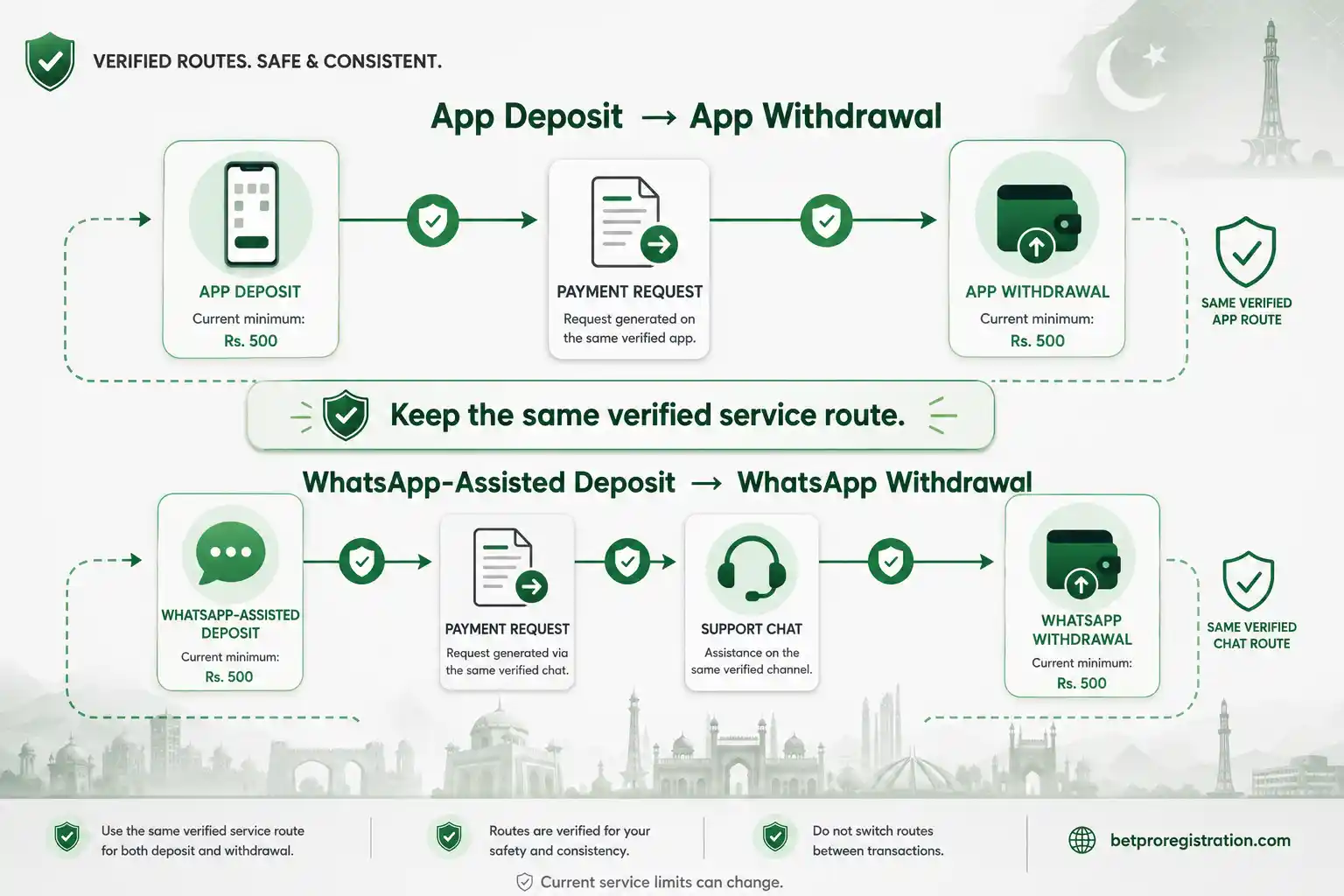
The app also supports withdrawal requests. If the related deposit was made through the app, the later withdrawal should be submitted through the app. This app-to-app rule keeps the transaction history on the same dealer-service path.
If the deposit was routed through WhatsApp-assisted support instead, the withdrawal belongs to the WhatsApp route rather than BPexch Wallet. Do not move a WhatsApp-funded transaction into the app just because a withdrawal function is visible.
The current minimum withdrawal is Rs. 500. Correctly submitted requests are commonly handled in around 3–5 minutes in the current dealer workflow, but this is not a guaranteed completion time. Account-holder-name mismatches, additional verification, or payment-service delays can take longer.
For full withdrawal instructions, use the BPexch Withdrawal guide after it is live. That guide covers request fields, name checks, timing, delayed requests, and payout troubleshooting in detail.
Payment Proof and Request Status
Payment proof is another wallet-like function documented on the current app route. The live Android page states that users can view payment proof, while the main app guide documents deposit status, withdrawal status, and notifications where supported by the current build.
Keep payment evidence accurate and privacy-safe. A receipt or screenshot may contain an account-holder name, wallet number, transaction reference, balance, QR code, or other personal information. Share only what is needed to identify the transaction.
Do not edit proof in a way that changes the amount, date, status, or reference. Redaction should remove unrelated private information, not alter the evidence. A clean record is useful if a BPexch Wallet request needs to be checked later.
Status information should also be treated as current, not permanent. Interface labels, notification behavior, and available request states can change with app updates. Use the live app as the final reference when a current screen differs from an older screenshot or tutorial.
Notifications and Account Updates
The current BetPro Vault download page promotes push notifications for important updates, and the main app guide documents push and in-app notification functions. These features can make the dealer app feel like a BPexch Wallet because users can follow request activity without relying only on chat messages.
A notification is useful, but it should not override normal verification. If a message asks you to move to an unknown number, share an OTP, install another APK, or send money to an unverified destination, return to the maintained app or dealer website before acting.
Do not assume every promotional push or recorded tutorial remains current forever. Versions, promotions, device requirements, and available service options can change. Current app and support instructions should take priority over an old notification screenshot.
For important payment questions, keep your own bank or wallet transaction record as well. A dealer-app status and a financial-service record answer different parts of the transaction and can both be useful when support needs to trace what happened.
Android Download: Use the Existing APK Guide
There is no need to create a separate BPexch Wallet download route. Android download intent already belongs to the current BetProExch App Download page, which links to the maintained BetPro Vault APK route on app.betproregistration.com.
That page covers the current Android build, installation flow, updates, version questions, device prompts, APK safety, and troubleshooting. Keeping that task on one guide prevents several competing download pages for the same dealer app.
Avoid unknown APK mirrors, Telegram files, forwarded attachments, or copied pages that use familiar names. Android’s installation permission should be granted only for the source you intentionally used and only when you are confident the file came through the maintained route.
If you already installed the current app, a BPexch Wallet download search should not lead you into installing a second wallet app. Use the existing dealer app and choose the appropriate dashboard function.
Is BPexch Wallet the Same as BetPro Vault?
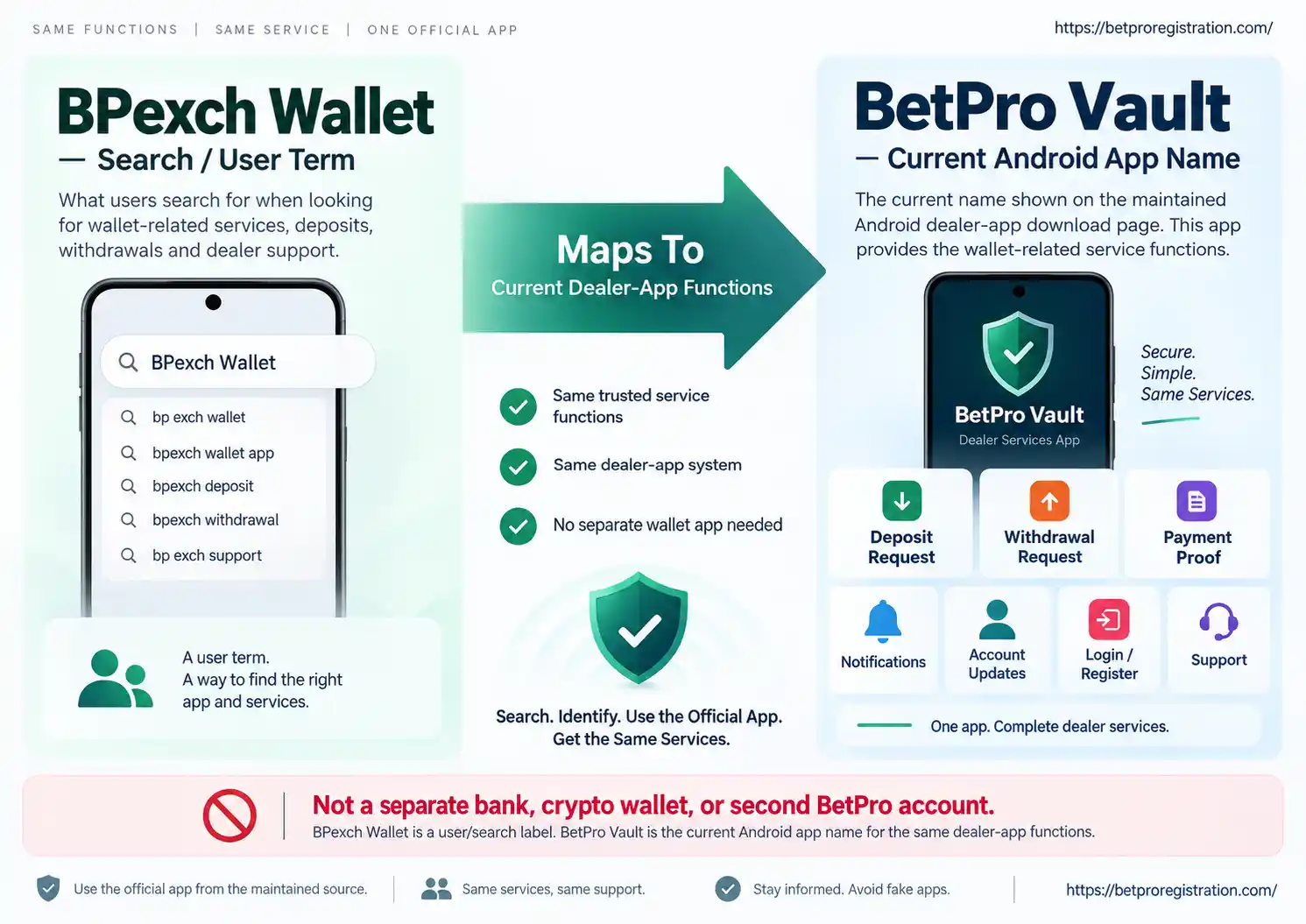
For this site, the safest answer is that BPexch Wallet is a user/search label for the wallet-like functions delivered through the current dealer app, while BetPro Vault is the name shown on the current live Android download page. They should not be presented as two separate apps that users need to install.
The maintained app provides the functions that explain the wallet terminology: login or registration, deposit requests, withdrawal requests, payment-proof viewing, request updates, push notifications, and support access. Users should map a BPexch Wallet search to the appropriate BetPro Vault function.
This distinction also prevents unsupported claims. We are not describing BetPro Vault as a licensed bank wallet, e-money wallet, cryptocurrency wallet, or independent financial account. It is the dealer-service app used for the current BetProRegistration workflow.
If the live app name changes in a future release, the operational route should still be checked through BetProRegistration.com. Search terminology can remain popular longer than product labels, so the maintained download page should remain the final reference for the current app name and build.
Dealer Dashboard vs BPexch App: What Is the Difference?
The BPexch App page is the broad mobile-access guide. It answers general questions about the app experience, mobile service route, and relationship to BetPro. The BPexch Wallet page is narrower: it explains wallet-like dashboard functions and routes users toward deposit, withdrawal, proof, status, login, or download help.
They refer to the same dealer-service ecosystem rather than two unrelated products. The difference is what the user needs. Someone searching BPexch app may simply want to know what the app is. Someone searching BPexch Wallet is more likely to be looking for a payment, dashboard, request, proof, or account-service function.
The download page remains separate because download APK, install, latest version, and update are software-acquisition tasks. Keeping those tasks on their own pages gives users a clearer next step.
When the task changes, follow the relevant guide instead of expecting one article to cover everything. This matters most for registration, login, deposit, withdrawal, and APK installation because those jobs already have dedicated pages.
How to Avoid Creating a Duplicate Account
A common mistake is assuming that a wallet-style app requires a second registration. If you already have a dealer-app login or BetPro ID, first use the existing account and correct login or recovery flow.
Do not create another account because the app was updated, renamed, reinstalled, or reached through a different page. App branding and domain routes can change without creating a new customer identity.
If you genuinely need a new account, use the normal BetPro Sign Up or BPexch Registration guide. If you already have an account but cannot log in, use the Login or ID Not Working guide. If you are unsure which state applies, ask verified dealer support before starting another registration.
Keep the registered phone or WhatsApp number under your control because the current app uses it for login and recovery. Protect passwords and OTPs and never send those credentials to an unverified contact.
Safety Checks Before Sending Payments
Because BPexch Wallet searches often lead toward deposits or withdrawals, payment verification deserves a clear boundary. The app is a dealer-service tool; your JazzCash, Easypaisa, NayaPay, SadaPay, UPaisa, or bank account remains a separate financial service under your control.
Support may need a transaction reference, amount, payment method, or privacy-safe receipt to identify a request. It should not need your wallet PIN, banking password, email password, or an OTP that gives another person control of your payment account.
Before sending money, confirm the recipient through the current app or verified dealer route. Payment destinations can change. An old number or screenshot should not be treated as a permanent recipient merely because it worked once.
After sending money, keep the transaction record until the request is reflected and any support question is resolved. If the first deposit appears delayed, verify the original transaction before sending a duplicate payment.
New User Safety Checklist
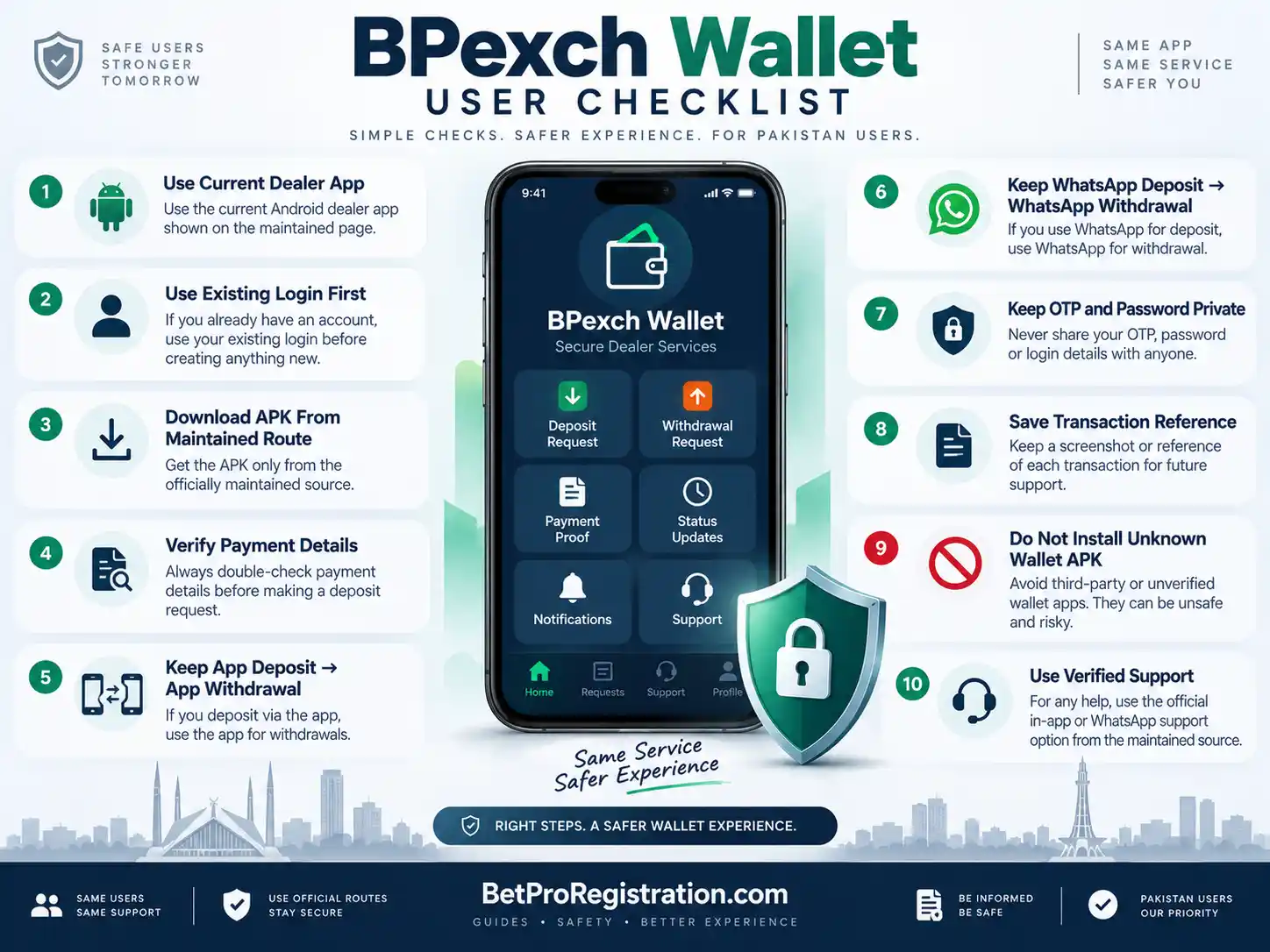
- Use the current BetProRegistration dealer app for wallet-like service functions.
- Recognize that the live Android download page currently calls the app BetPro Vault.
- Do not search for a separate wallet APK when the existing dealer app already serves the task.
- Use the BPexch App page for general app information.
- Use the App Download page for APK, install, version, and update questions.
- Use existing credentials before considering a new registration.
- Use BetPro Sign Up or BPexch Registration only when you genuinely need a new account.
- Protect your registered phone number, password, and OTP.
- Confirm current payment instructions before a deposit.
- Remember the current minimum deposit is Rs. 500.
- Keep app deposits and app withdrawals on the app route.
- Keep WhatsApp-routed deposits and withdrawals on the WhatsApp route.
- Remember the current minimum withdrawal is Rs. 500.
- Keep transaction references and privacy-safe payment evidence.
- Do not share wallet PINs, banking passwords, or remote-access codes.
- Use verified dealer support when the account or transaction route is unclear.
- Review Responsible Gambling guidance before using funds for betting.
Check the live dealer app whenever an older screenshot or tutorial conflicts with the current service interface.
Choosing the Right Service Route for Each Task
Using one dealer app for several service tasks is convenient. Users can access onboarding, deposit requests, withdrawal requests, proof, updates, notifications, and support from the same ecosystem. The trade-off is that different tasks still have different rules, and the app should not be treated as a substitute for every specialist page.
A wallet-style dashboard can reduce messaging back-and-forth, especially for users who prefer self-service. Human WhatsApp assistance can be better when a user needs clarification. The important choice is not which route sounds more modern; it is which verified route you can follow consistently.
Push notifications can make request tracking easier, but they also create a habit of reacting quickly. Users should still verify unusual instructions, especially messages involving new payment destinations, OTPs, APK files, or requests to move to another contact.
The term BPexch Wallet is useful because it matches how people search, but it can create confusion if treated as a separate product. This page solves that problem by matching the query while identifying the current BetPro Vault dealer-app route and keeping app, download, deposit, withdrawal, and registration guidance separate.
Next Steps
If you searched BPexch Wallet because you want the current app dashboard, start from BetProRegistration.com and use the maintained dealer app. If Android download or installation is the problem, go directly to the BetProExch App Download guide rather than searching for another wallet APK.
If you want to deposit, use the app route if that is your chosen service path and follow the BPexch Deposit guide for complete payment instructions. If you want to withdraw, use the same route as the related deposit and follow the dedicated withdrawal guide.
If you are a new user, use BetPro Sign Up or the BPexch Registration guide. Do not create a separate wallet registration. The dealer-app onboarding route leads toward the BetPro ID used on the platform.
If you need human help, open authorized dealer WhatsApp support from BetProRegistration.com. Keep passwords, OTPs, wallet PINs, banking passwords, and remote-access credentials private.
References and Current Service Notes
The current BetProRegistration App Download page documents the authorized-dealer service app as an online route for signup, BetPro ID onboarding, deposit requests, withdrawal requests, request status, notifications, payment proof, and 24/7 support. It directs Android users to the current app.betproregistration.com download route.
The live Android download page currently names the app BetPro Vault and describes deposit requests, withdrawal requests, payment-proof viewing, account updates, push notifications, login or registration, and support access. That current feature set is the factual basis for explaining why users may search for BPexch Wallet.
This article deliberately does not repeat promotional percentages, hard-coded app versions, permanent file sizes, or permanent payment recipients. Those details can change. Current app, payment, and support instructions should be checked through the live maintained route.
For on-page SEO implementation, the current Rank Math Score 100/100 guidance is used because the requested project PDF was not available in the File Library. Rank Math checks focus-keyword placement across the title, description, URL, early content, headings, body, and image ALT while warning against excessive repetition.
Is BPexch Wallet a separate app from BetPro Vault?
Not for the current BetProRegistration workflow. BPexch Wallet is used here as a search label for the wallet-like dealer-app functions, while BetPro Vault is the name shown on the current Android download page. Users should use the maintained dealer-app route rather than search for a second wallet APK.
Can I use the app for deposits and withdrawals?
The current dealer app supports deposit and withdrawal requests. Keep the service route consistent: app-routed deposits later use the app withdrawal route, while WhatsApp-routed deposits later use WhatsApp for withdrawal requests.
Where should I download the Android app?
Use the existing BetProExch App Download page on BetProRegistration.com, which points to the maintained BetPro Vault Android download route. Do not install unrelated APK files simply because they use BPexch Wallet wording.
Use the Right BPexch Service Route
Use BPexch Wallet as a task guide, not as a reason to install another app. Start from the maintained BetProRegistration dealer app, choose the dashboard function you need, keep payment routes consistent, and use the dedicated registration, login, deposit, withdrawal, or APK guide whenever your task needs deeper instructions.