
BPexch Deposit Pakistan: Safe Expert Payment Guide
TL;DR
A BPexch payment in Pakistan should begin with one simple rule: use the same verified service route from start to finish. BetProRegistration.com operates as an authorized BetPro dealer service and currently supports two practical routes. Users can follow the BetProRegistration online app, or they can use verified WhatsApp support for human-assisted service. The current minimum BPexch deposit is Rs. 500. Available payment methods can include JazzCash, Easypaisa, UPaisa, NayaPay, SadaPay, bank transfer, and other methods shown or confirmed by the current service route.
For a BPexch deposit, never send funds to a payment number copied from an unknown social post, forwarded message, comment, or unrelated website. Confirm the current recipient and instructions immediately before paying. Keep the payment receipt or transaction reference, but do not publish a screenshot that exposes your OTP, wallet PIN, banking password, full account number, or other unnecessary private information.
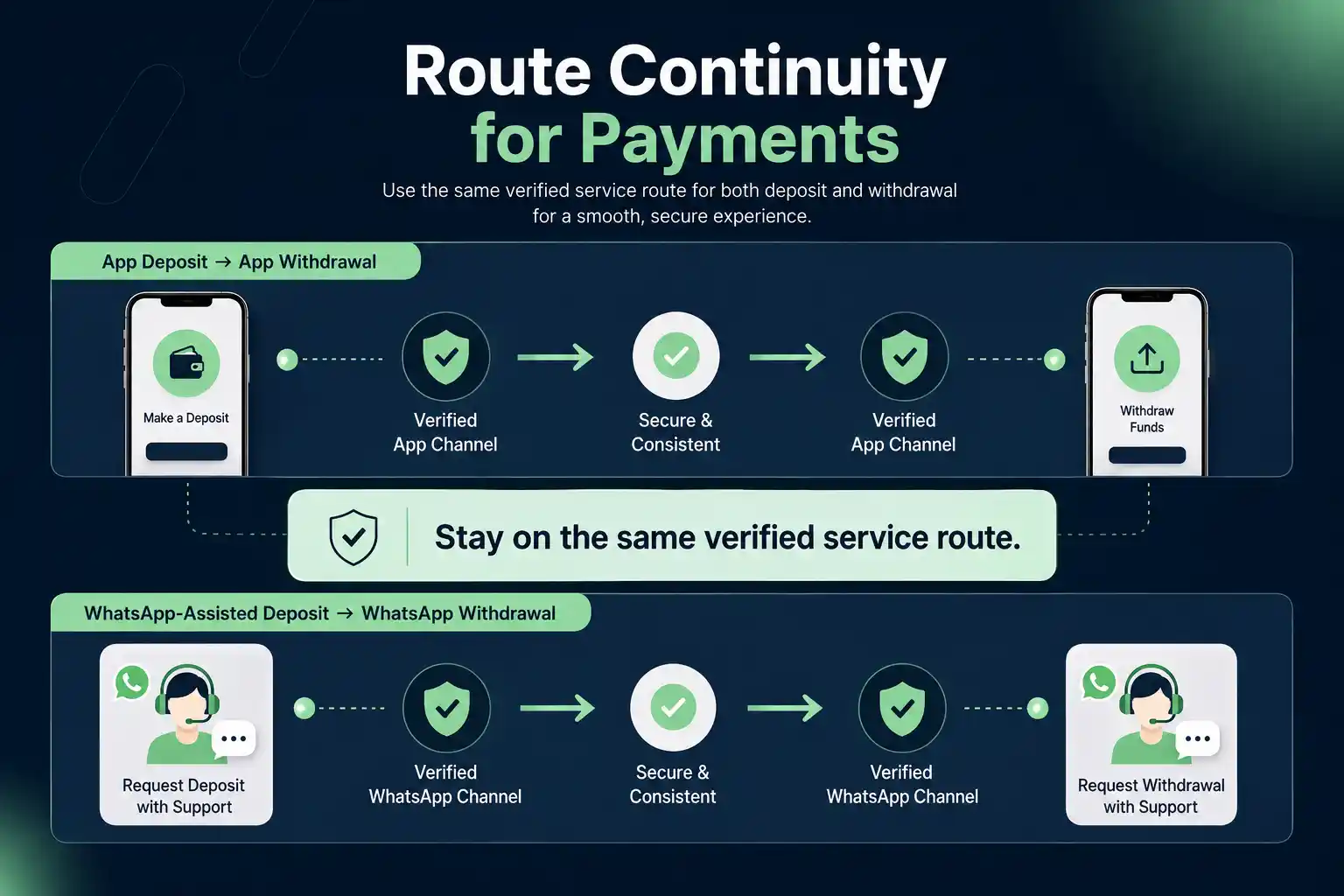
The most important continuity rule is also simple. If your BPexch payment is handled through the BetProRegistration app, later withdrawal requests for that route must also be handled through the app. If your BPexch deposit is routed through WhatsApp-assisted service, the later withdrawal request must go through the WhatsApp route. Keeping the same route helps support match the transaction history and reduces avoidable confusion.
Before You Make a BPexch Deposit
People searching for BPexch deposit usually want an operational answer, not another account-registration tutorial. They may already have a BetPro ID and want to know the minimum amount, which payment methods can be used, where to send money, what proof to keep, what to do if the balance does not update, and how a later withdrawal is connected to the deposit route.
This guide stays focused on BPexch payment handling. If you still need to create an account, use BetPro Exchange Registration or the BPexch Registration guide. If you need to understand the issued credential itself, use BetPro ID Pakistan.
BetPro is the platform users ultimately access with their BetPro ID. BetProRegistration.com is the authorized dealer service that assists with onboarding and ongoing account support. The BetProRegistration app is a dealer-service route, not the BetPro platform itself. That distinction matters when describing a BPexch deposit because users need to know which service route is handling the transaction.
A first BPexch payment can also be part of onboarding. Under the current dealer process, the required signup steps and required initial deposit are completed before the BetPro ID is issued. Later deposits happen after the user already has the ID. The operational payment method or recipient can change, so current app instructions or verified human support should take priority over an old article, screenshot, or copied payment number.
BPexch Deposit: Current Minimum and Payment Methods
The current minimum BPexch deposit is Rs. 500. That is the working minimum for the dealer service at the time this guide is published. Because payment rules can change, confirm the live minimum if you are returning to the service after a long gap or if the current app or support route displays a different instruction.
Common BPexch payment methods currently supported through the dealer service can include JazzCash, Easypaisa, UPaisa, NayaPay, SadaPay, bank transfer, and other methods offered at the time of the transaction. The presence of a payment brand in this guide does not mean one fixed receiving number or account will remain valid permanently. Always use the recipient details shown or confirmed for your current transaction.
For a BPexch deposit, the payment method matters less than the verification step before payment. A familiar wallet logo or payment number is not proof by itself. Confirm the destination through the same route you are using for service, check the amount, and keep enough evidence to identify the transaction later if support needs to trace it.
JazzCash BPexch Deposit
For a JazzCash BPexch payment, start from the app or verified dealer support route and obtain the current payment instruction there. Check the recipient details before sending Rs. 500 or more. After payment, keep the transaction confirmation or reference available. Do not send your JazzCash PIN, OTP, password, or unrelated account credentials to a support contact.
If the JazzCash BPexch deposit is part of WhatsApp-assisted service, continue using that support route if a transaction-status question appears. If the deposit is initiated and managed inside the dealer app, keep later account-funding and withdrawal activity in the app route unless the verified service specifically instructs otherwise.
Easypaisa BPexch Deposit
An Easypaisa BPexch payment follows the same verification principle. Confirm the current receiving details through the app or verified human support before sending funds. Review the amount carefully, complete the transfer in your own Easypaisa interface, and retain the transaction record. Support may need a transaction reference or a privacy-safe receipt if the payment has to be checked.
Do not treat an old Easypaisa number as a permanent BPexch deposit destination. Payment destinations can change. A screenshot from another user, an old blog post, or a forwarded WhatsApp message may be outdated even when it looks familiar. Current instructions from the active service route are the safer reference.
UPaisa, NayaPay, SadaPay, and Bank Transfer
A BPexch payment may also be handled with UPaisa, NayaPay, SadaPay, bank transfer, or another currently supported method.
Bank-transfer details deserve the same care as wallet details. Before making a BPexch deposit, check the account name or other recipient information shown by the verified service. Do not assume that a bank account used for one transaction will be the correct destination for every future transaction.
How to Make a BPexch Deposit Through WhatsApp Support
The WhatsApp-assisted BPexch payment route is designed for users who want human help. BetProRegistration.com provides 24/7 human dealer support. Start the conversation through verified WhatsApp support linked from the dealer website rather than searching for a random number.
For a BPexch deposit through this route, first tell support that you want to deposit to your existing account or that you are completing the required initial deposit during onboarding. Follow the current instructions, verify the payment destination, and send the required amount using the payment method agreed for that transaction.
After completing the BPexch payment, keep the payment record. If support asks for proof, share only what is needed to identify the transaction. A useful receipt may show the paid amount, date or time, payment method, and transaction reference, but you should redact or avoid exposing unrelated balances, passwords, OTPs, wallet PINs, full banking credentials, or other private data.
For the WhatsApp-assisted BPexch deposit route, continuity matters later. If the deposit was routed through WhatsApp, the withdrawal request for funds associated with that route must also be made through WhatsApp. Do not switch to the app for the withdrawal simply because it looks more convenient. The original route is part of the account-service history.
What to prepare before messaging support
Before starting a BPexch payment conversation, have your correct BetPro ID or username available, know the amount you intend to deposit, and have access to the payment method you plan to use. If the support team needs a payment reference after the transfer, provide the relevant reference without including unrelated sensitive information.
Do not send your existing password, OTP, wallet PIN, banking password, email password, device unlock code, or remote-access code for a normal BPexch deposit. Pakistan’s National CERT has warned that social-engineering attacks commonly use impersonation and requests for verification codes, while State Bank of Pakistan guidance emphasizes protecting personal credentials in digital-payment fraud scenarios.
How to Make a BPexch Deposit Through the Dealer App
The online dealer app gives users a self-service route for onboarding and later account service. A BPexch payment through the app should be completed using the live fields and payment instructions shown in that service flow. Because app screens and payment options can change, the current app is the final reference for changing operational details.
If you are new, the app route can include signup details, verification steps, the required initial BPexch deposit, and BetPro ID issuance after the required onboarding steps are completed. If you already have an ID, use the relevant deposit function or current instructions associated with your account rather than starting another registration.
The continuity rule is strict for this route: if the BPexch payment was made through the app service, a later withdrawal request must also be made through the app. This keeps the deposit and withdrawal on the same service path. If a user deposited through WhatsApp instead, the withdrawal belongs to WhatsApp support, not the app.
For general mobile information, use the BPexch App guide. For Android download, installation, update, or APK questions, use the BetProExch App Download guide.
BPexch Deposit Withdrawal: Why the Route Must Stay the Same
Users often ask whether the way they deposit affects how they later withdraw. Under the current dealer process, yes. Route continuity is a core service rule.
If your BPexch deposit was handled through the BetProRegistration app, submit the later withdrawal through the app. If your BPexch payment was handled through WhatsApp-assisted dealer support, submit the withdrawal request through WhatsApp. Mixing routes can make it harder to match the transaction trail and can create unnecessary support work.
This does not mean a BPexch deposit and withdrawal are the same transaction. They are separate account-service actions. The point is that the support route used for the deposit determines the route used for the later withdrawal request. Users should remember that rule before choosing the most convenient deposit path.
For WhatsApp-routed withdrawals, the current support form can ask for information such as username or ID name, registered number, amount, bank or wallet name, account-holder name, and account number. The current minimum withdrawal is also Rs. 500. This section focuses only on how the deposit route affects the later withdrawal route.
How to Verify a BPexch Deposit Before Sending Money
The most important BPexch payment safety check happens before the transfer. Start from BetProRegistration.com, its dealer app, or the verified support link available from the website. Do not begin from a number posted in a public comment, Telegram group, copied social profile, or forwarded screenshot.
Next, confirm the recipient details for that specific BPexch deposit. If the destination looks different from a previous transaction, do not automatically assume it is wrong or correct. Payment routes can change. Verify the current instruction through the same service path before you send funds.
Check the BPexch payment amount before confirming the payment. The current minimum is Rs. 500, but a higher amount should still match what you actually intend to send. If a support contact pressures you to send more than planned, promises guaranteed winnings, or creates artificial urgency, stop and verify the source.
Finally, keep your own transaction evidence. State Bank of Pakistan requires regulated banks and financial institutions to provide transaction alerts for digital payments, and those alerts can help users identify when an account was debited or credited. A wallet or bank confirmation is useful evidence, but it should be handled privately.
Payment details that should remain private
A BPexch deposit does not require you to expose every detail of your financial account. Keep OTPs, wallet PINs, banking passwords, email passwords, card security codes, device unlock credentials, and remote-access codes private. If someone asks for those details, stop the transaction and verify the contact independently.
National CERT Pakistan’s 2026 WhatsApp account-hijacking advisory specifically describes scams where attackers impersonate trusted contacts or service providers and ask users to share verification codes. That is directly relevant when a BPexch payment conversation happens over WhatsApp: the support channel should never become a reason to surrender control of your WhatsApp or payment account.
What Proof Should You Keep After a BPexch Deposit?
After a BPexch deposit, keep enough evidence to identify what happened without creating a privacy problem. Useful information can include the amount, transaction date and time, payment method, transaction or reference ID, and a screenshot of the confirmation when one is available.
If you send a BPexch payment receipt to support, crop or redact information that is not required for the transaction check. A payment screenshot can contain account-holder names, wallet numbers, balances, QR codes, reference numbers, or other personal data. Share only the portion needed to match your payment.
Keep the original BPexch deposit confirmation until the account balance reflects the transaction and any immediate support question is resolved. Do not edit a receipt in a way that changes the amount, date, reference, or payment status. Redaction should remove unnecessary private information, not alter the evidence.
What If a BPexch Deposit Is Not Showing?
If a BPexch payment is not reflected where you expect, do not immediately send a second payment. First confirm that the original payment actually left your wallet or bank account. Check the transaction status and reference in the payment service you used.
Next, return to the same route that handled the BPexch deposit. App users should check the app route. WhatsApp-assisted users should contact the same verified dealer support route. Provide the relevant account identifier, amount, payment method, and transaction reference. A privacy-safe receipt may help if support needs to trace the payment.
A missing BPexch payment can have different causes, including a payment still processing on the financial-service side, an incorrect recipient, a wrong account identifier, a mismatch in submitted details, or a service-status issue. Do not invent the cause yourself. Give support the evidence and let the current transaction be checked.
Avoid duplicate BPexch payment attempts while the first payment is unresolved unless verified support specifically confirms that the original transaction failed and tells you what to do next. Sending repeated payments can create a more complicated reconciliation problem.
BPexch Deposit During New Account Registration
A BPexch deposit during onboarding follows a different context from adding funds to an existing ID. Under the current BetProRegistration dealer workflow, users complete the required signup steps and required initial deposit before the BetPro ID is issued. The deposit is therefore part of onboarding, not something that always happens only after account activation.
Users who choose the WhatsApp-assisted route should follow the current registration and BPexch payment instructions provided through verified dealer support. Users who choose the online dealer app should follow the current signup, verification, and payment fields shown in the app.
Do not create a second registration because an existing BPexch deposit or login appears delayed. If you already have a BetPro ID, troubleshoot the existing account first. For access issues, use the BetPro Login guide or the BetPro ID Not Working guide.
Common BPexch Deposit Mistakes to Avoid
Using an old payment number
A previous BPexch payment destination may not remain current forever. Always verify the active recipient before paying, even if you have deposited successfully in the past.
Switching service routes halfway through
Starting a BPexch deposit in the app and then trying to continue the same transaction through an unrelated WhatsApp contact can create confusion. Use one verified service route for the transaction and preserve that route for later withdrawal.
Sending a duplicate payment too quickly
If a BPexch payment is not immediately visible, check the original payment status and contact the same service route before sending more money. A duplicate payment is not a troubleshooting method.
Sharing too much information
A BPexch deposit support check may need an account identifier and transaction evidence, but that does not justify sharing your OTP, wallet PIN, banking password, email password, or remote-access code.
Ignoring the account-holder name
Accurate names matter across payment support. A mismatch between the account details and the payment account can create additional verification work. Use accurate information and explain legitimate differences rather than changing details casually.
Following guaranteed-profit or bonus pressure
A BPexch deposit should be based on your own decision and budget, not on a promise that profits are guaranteed. Avoid anyone who pressures you to deposit urgently because a “sure win,” fixed income, guaranteed bonus, or risk-free opportunity is about to disappear.
BPexch Deposit Safety Checklist
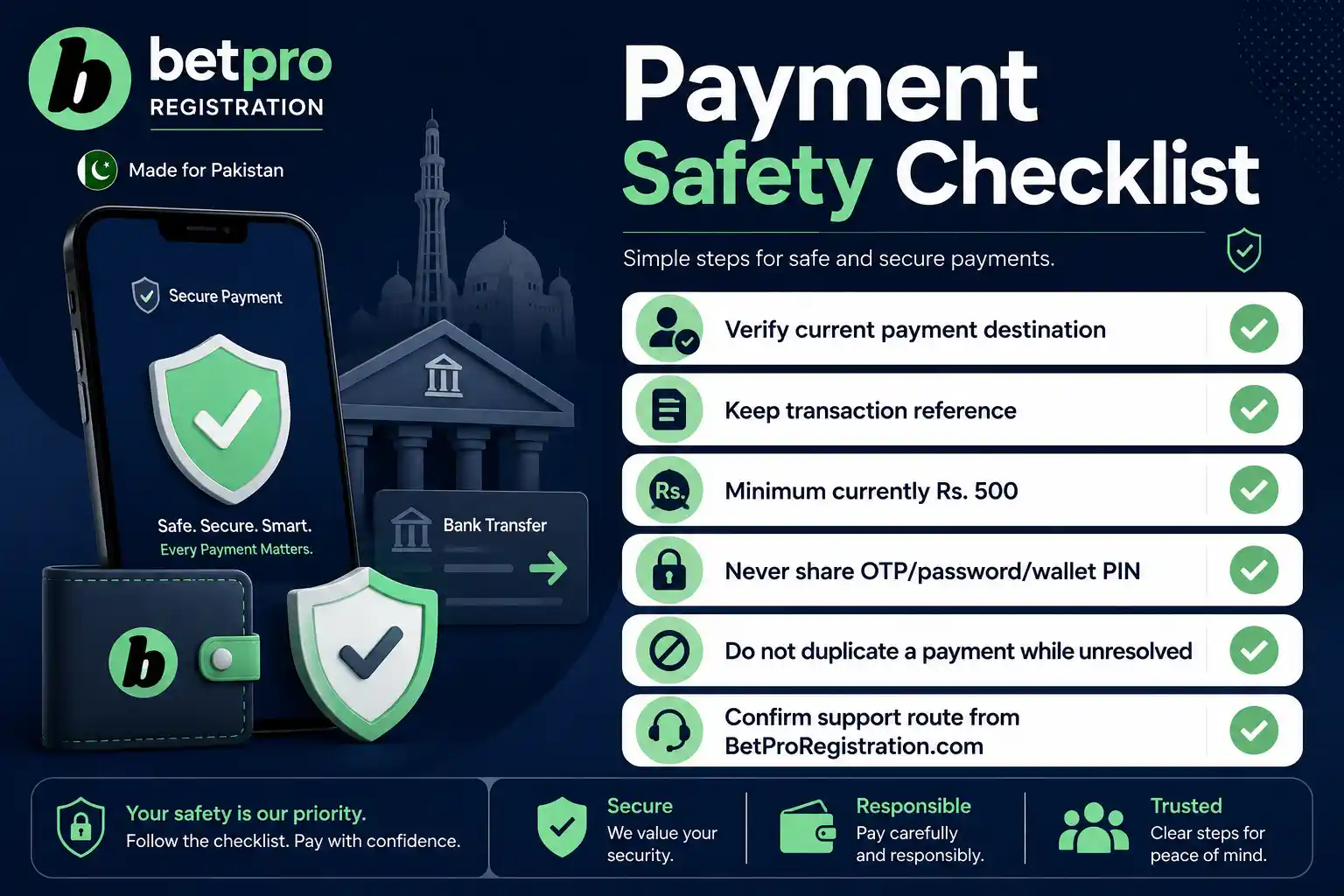
- Start the BPexch payment from BetProRegistration.com, its dealer app, or verified dealer support.
- Confirm the current recipient and payment method before sending funds.
- Remember that the current minimum BPexch deposit is Rs. 500.
- Use your chosen payment method only after checking the live instructions.
- Keep the transaction reference and a privacy-safe receipt.
- Never share passwords, OTPs, wallet PINs, banking passwords, or remote-access codes.
- Do not send a second BPexch payment while the first is unresolved without verified guidance.
- Keep app deposits and app withdrawals on the app route.
- Keep WhatsApp-routed deposits and withdrawals on the verified WhatsApp route.
- Use only funds you can afford to lose and review the Responsible Gambling guidance before betting.
App vs WhatsApp BPexch Deposit
The app and WhatsApp routes solve the same broad BPexch deposit need in different ways. The app gives self-service convenience. WhatsApp-assisted service gives direct human coordination. Neither route should be called universally better; the important point is to choose the route you can follow consistently.
A WhatsApp BPexch payment can be helpful when a user wants to ask a human about the current payment method or recipient before sending money. The trade-off is that users must verify the support contact carefully because messaging platforms are also used for impersonation scams.
An app-based BPexch deposit can reduce back-and-forth messaging because the service flow can present the current fields directly. Users still need the correct current app and should not install APK files from unknown mirrors. Use the BetProExch App Download guide when installation help is needed.
The Rs. 500 BPexch payment minimum gives users a clear current baseline, but a static article should not turn that value into a permanent promise. Operational limits can change. The live verified route should win if a current instruction differs from an older cached version of this page.
Payment-method variety is convenient, but it also creates more opportunities for outdated recipient details to circulate. Whether you use JazzCash, Easypaisa, UPaisa, NayaPay, SadaPay, or bank transfer, the safest BPexch deposit habit is to verify the current destination every time.
Next Steps
If you already have a BetPro ID and want to make a BPexch deposit today, decide whether you will use the dealer app or human-assisted WhatsApp service. Then remain on that route for the transaction and remember that the same route will be used for a later withdrawal request.
For WhatsApp-assisted service, open authorized dealer WhatsApp support from BetProRegistration.com, confirm the current BPexch payment method and recipient, and follow the live instructions. For app service, use the current BetProRegistration app flow and follow the payment details displayed for your account.
If you are still registering, begin with BetPro Exchange Registration or the BPexch Registration guide. The required initial BPexch deposit is part of the current onboarding sequence before the BetPro ID is issued.
If the payment has already been sent but is not reflected, do not immediately pay again. Check the original transaction status, keep the reference, and return to the same verified BPexch payment route for support.
Sources and Current Process Notes
This guide uses the current BetProRegistration authorized-dealer workflow documented for Pakistan in 2026: WhatsApp-assisted and online dealer-app service routes, Rs. 500 current minimum deposit, JazzCash, Easypaisa, UPaisa, NayaPay, SadaPay, bank transfer and other currently offered methods, initial-deposit-before-ID sequencing, 24/7 human dealer support, and route continuity between deposit and withdrawal.
For payment-security context, see the State Bank of Pakistan guidance on security of digital payments. SBP requires timely transaction alerts and OTP delivery by regulated financial institutions, which supports the practical advice to keep transaction records and verify debit or credit status.
For messaging-security context, see the National CERT Pakistan 2026 WhatsApp account-hijacking advisory. It describes impersonation, phishing, and verification-code theft, which is why this guide repeatedly warns users not to share OTPs or trust an unverified support contact.
What is the minimum BPexch deposit in Pakistan?
The current minimum BPexch deposit is Rs. 500 through the BetProRegistration dealer service. Because operational limits can change, confirm the current amount through the app or verified dealer support before paying.
Can I make a BPexch deposit with JazzCash or Easypaisa?
Yes. Current BPexch payment methods can include JazzCash, Easypaisa, UPaisa, NayaPay, SadaPay, bank transfer, and other methods offered by the active service route. Always verify the current recipient details before sending funds.
Does BPexch deposit withdrawal use the same support route?
Yes. If the BPexch deposit was made through the app, the later withdrawal request must also use the app. If the deposit was routed through WhatsApp-assisted dealer support, the withdrawal request must go through WhatsApp.
Conclusion
Ready to make a BPexch deposit? Use the verified dealer app or authorized dealer WhatsApp support, confirm the current payment destination, keep your transaction reference, and stay on the same service route for any later withdrawal. Protect your credentials, avoid copied payment numbers, and deposit only an amount you are prepared to risk.