
TL;DR
A BPexch withdrawal in Pakistan should follow the same verified service route used for the related deposit. If you deposited through the BetProRegistration app, submit the withdrawal through the app. If your deposit was handled through WhatsApp-assisted dealer support, submit the withdrawal request through the verified WhatsApp route. The current minimum withdrawal is Rs. 500.
For a WhatsApp-routed BPexch withdrawal, the current support form can ask for your username or ID name, registered number, withdrawal amount, bank or wallet name, account-holder name, and account number. Enter those details carefully. The most common problem reported in the current dealer workflow is an account-holder-name mismatch, so names and payment details should be checked before the request is sent.
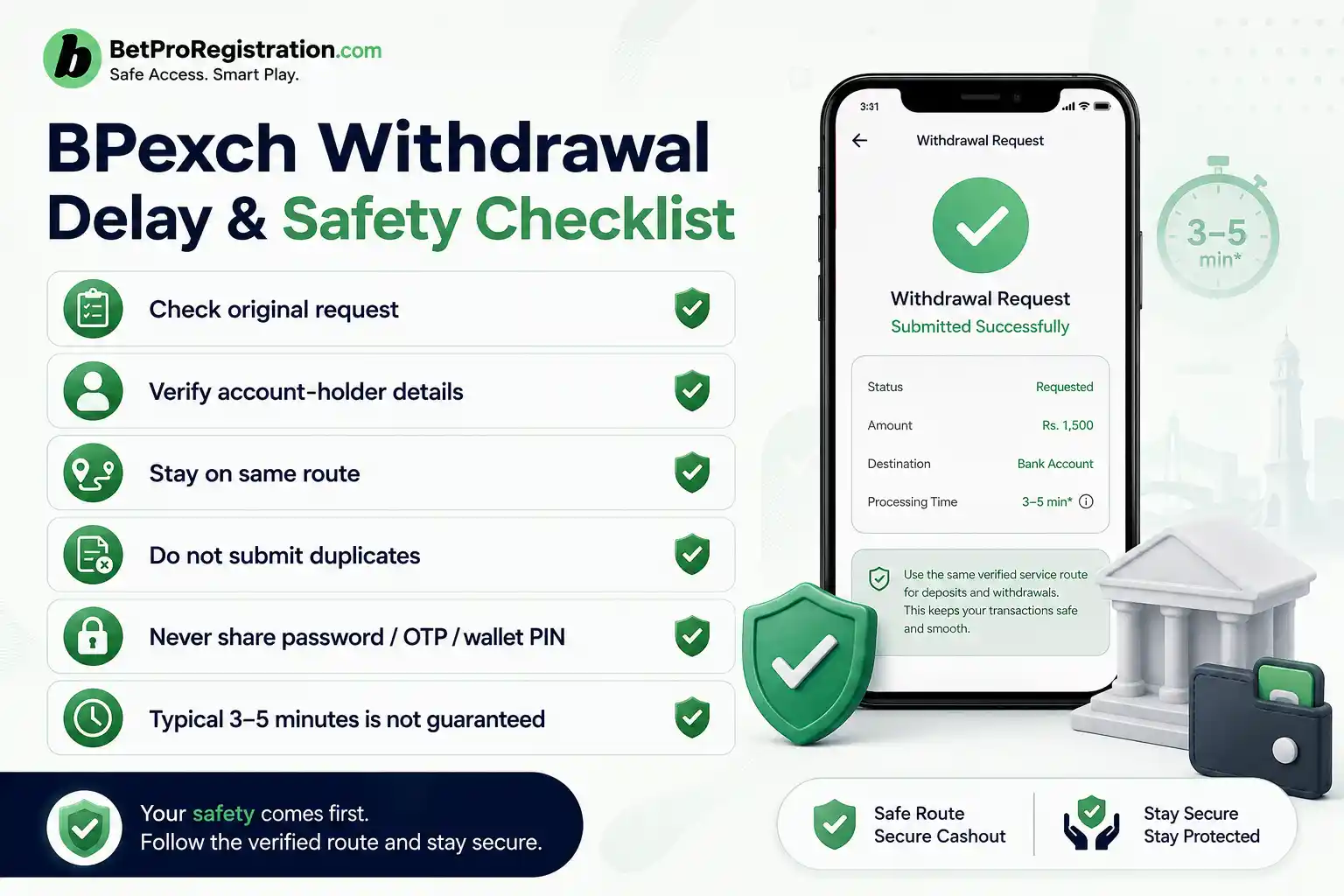
Correctly submitted BPexch withdrawal requests are commonly handled in around 3–5 minutes in the current dealer process, but this is not a guaranteed completion time. Additional verification, mismatched information, payment-service delays, or an account-specific issue can take longer. Do not submit repeated withdrawal requests simply because the first one is still being checked.
Before You Request a BPexch Withdrawal
People searching for BPexch withdrawal usually want a practical cashout guide. They may already have a BetPro ID, already know how to log in, and simply need to know which route to use, what information is required, how much they can request, and what to do when a withdrawal does not arrive as expected.
This page stays focused on withdrawal execution and troubleshooting. If you need to add funds instead, use the BPexch Deposit guide. If you still need an account, start with BetPro Exchange Registration or the BPexch Registration guide. If your ID itself is not working, use BetPro ID Not Working.
BetPro is the platform users access with their BetPro ID. BetProRegistration.com operates as an authorized BetPro dealer service and provides onboarding plus ongoing account support. The BetProRegistration app is a dealer-service route, not the BetPro platform itself. That distinction is important because a BPexch withdrawal is handled through the service route connected to the earlier deposit.
The safest preparation is simple: confirm the deposit route, check the amount you want to withdraw, make sure your bank or wallet details are accurate, and use only the verified app or dealer-support route. Do not share passwords, OTPs, wallet PINs, banking passwords, email passwords, or device-access codes in a normal withdrawal request.
BPexch Withdrawal: What Works
A successful BPexch withdrawal depends on three things more than anything else: route continuity, accurate payment details, and a clear transaction record. The request should go through the same service channel that handled the deposit, and the bank or wallet information should match the person and account involved in the request.
For WhatsApp-assisted users, the current withdrawal form asks for structured information so support can identify the account and payment destination. For app users, the live app workflow is the operational reference because fields and interface details can change. In either route, the user should review the information before submission instead of rushing through the form.
BPexch Withdrawal Minimum in Pakistan
The current minimum withdrawal is Rs. 500. If your requested amount is below that level, increase it to at least the current minimum before submitting. Operational limits can change, so if the current verified app or support route displays a different live minimum later, follow the current instruction rather than relying on an older cached article.
The Rs. 500 minimum does not mean every request will be processed identically. Account status, payment-method availability, information mismatches, or additional verification can affect the handling of a particular request. Treat the minimum as the current entry threshold, not as a promise about timing or approval.
BPexch Withdrawal Through WhatsApp Support
If your deposit was routed through WhatsApp-assisted dealer service, your withdrawal request should also go through WhatsApp. Start from verified WhatsApp support linked from BetProRegistration.com. Do not use a number copied from an unknown website, social post, comment, Telegram group, or forwarded message.
Tell support that you want to submit a withdrawal request and provide the information requested in the current form. Keep the conversation focused on the transaction. If a contact asks for unrelated credentials or pressures you to reveal an OTP, wallet PIN, banking password, or remote-access code, stop and verify the contact again from the dealer website.
BPexch Withdrawal Form Details
For the current WhatsApp-assisted withdrawal process, prepare these fields:
- USERNAME ID NAME
- REGISTER NUMBER
- AMOUNT
- BANK/WALLET NAME
- ACCOUNT HOLDER NAME
- ACCOUNT NO.
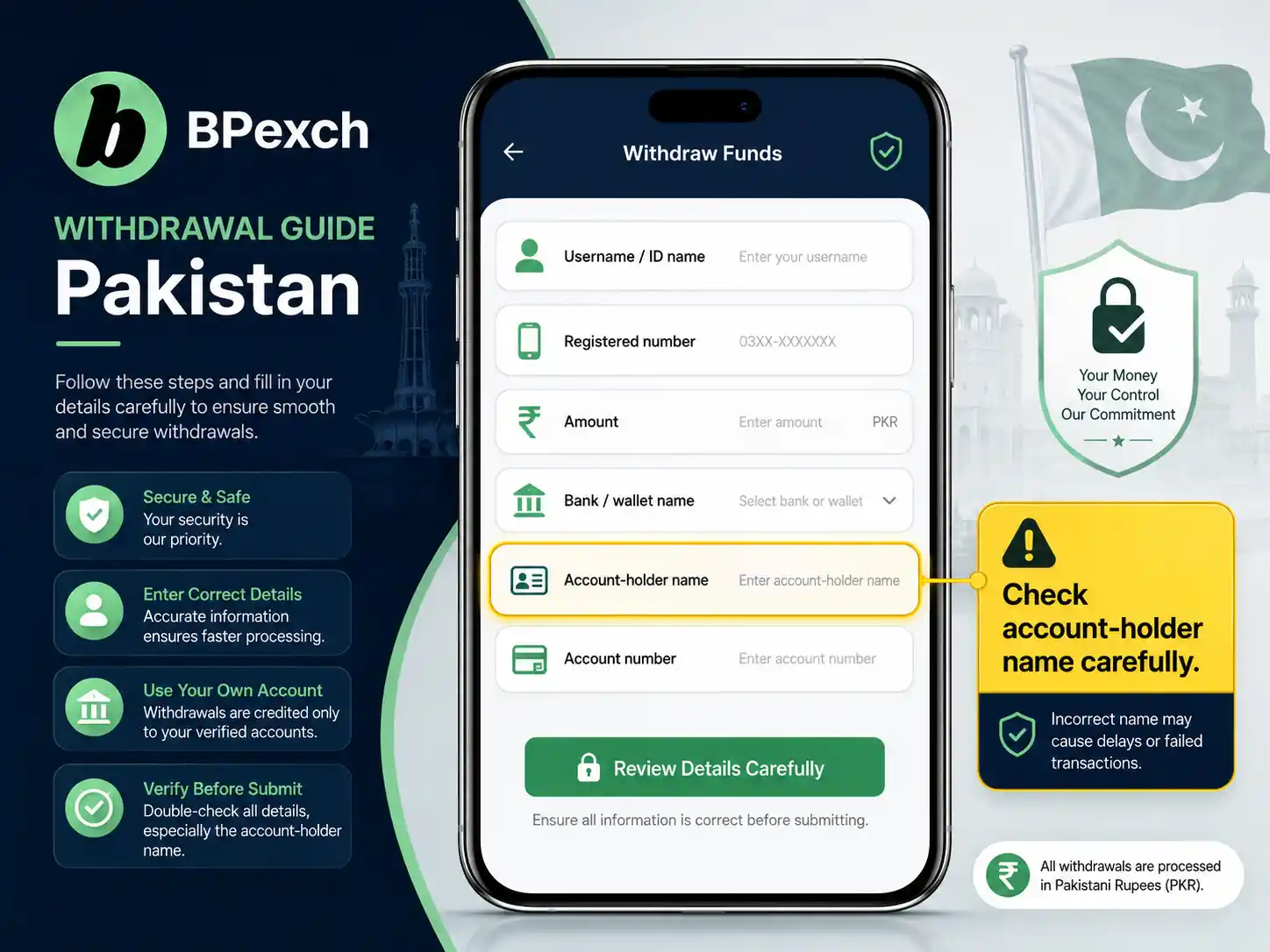
Enter the BetPro username or ID name that support can use to identify the account. Use the registered number associated with the service history. Enter the requested amount carefully and make sure it meets the current minimum.
For BANK/WALLET NAME, state the payment destination you actually want to use, such as the supported wallet or bank route confirmed for the request. For ACCOUNT HOLDER NAME and ACCOUNT NO., copy the details carefully from the payment account rather than relying on memory. Small errors can create avoidable verification work.
Check the Account-Holder Name Before Sending
The most common BPexch withdrawal issue in the current dealer workflow is a mismatch in the account-holder name. This may happen when the name submitted in the request does not match the bank or wallet account, when spelling differs, or when a user tries to use another person’s payment account without first explaining the situation.
Before sending the withdrawal form, compare the account-holder name against the payment account. Use the correct spelling and avoid unnecessary abbreviations. If there is a legitimate difference that cannot be corrected, explain it to verified support instead of changing details randomly until a request appears to work.
BPexch Withdrawal Through the Dealer App
If your earlier deposit was made through the BetProRegistration app, your withdrawal must also be submitted through the app. Use the current withdrawal function or instructions shown for your account. Do not move the withdrawal to WhatsApp simply because you see a support contact elsewhere.
The app route gives users a self-service path, but the same accuracy rules apply. Review the amount, bank or wallet information, and account-holder details before confirming the request. If the app asks for a field that is not described in this article, follow the current app instruction because interface and service fields can change.
For general app information, use the BPexch App guide. For Android download, installation, update, or APK questions, use the BetProExch App Download guide. Withdrawal problems that are actually app-installation problems should be handled through the correct app guidance rather than by creating another account.
BPexch Deposit Withdrawal Route: Keep It Consistent
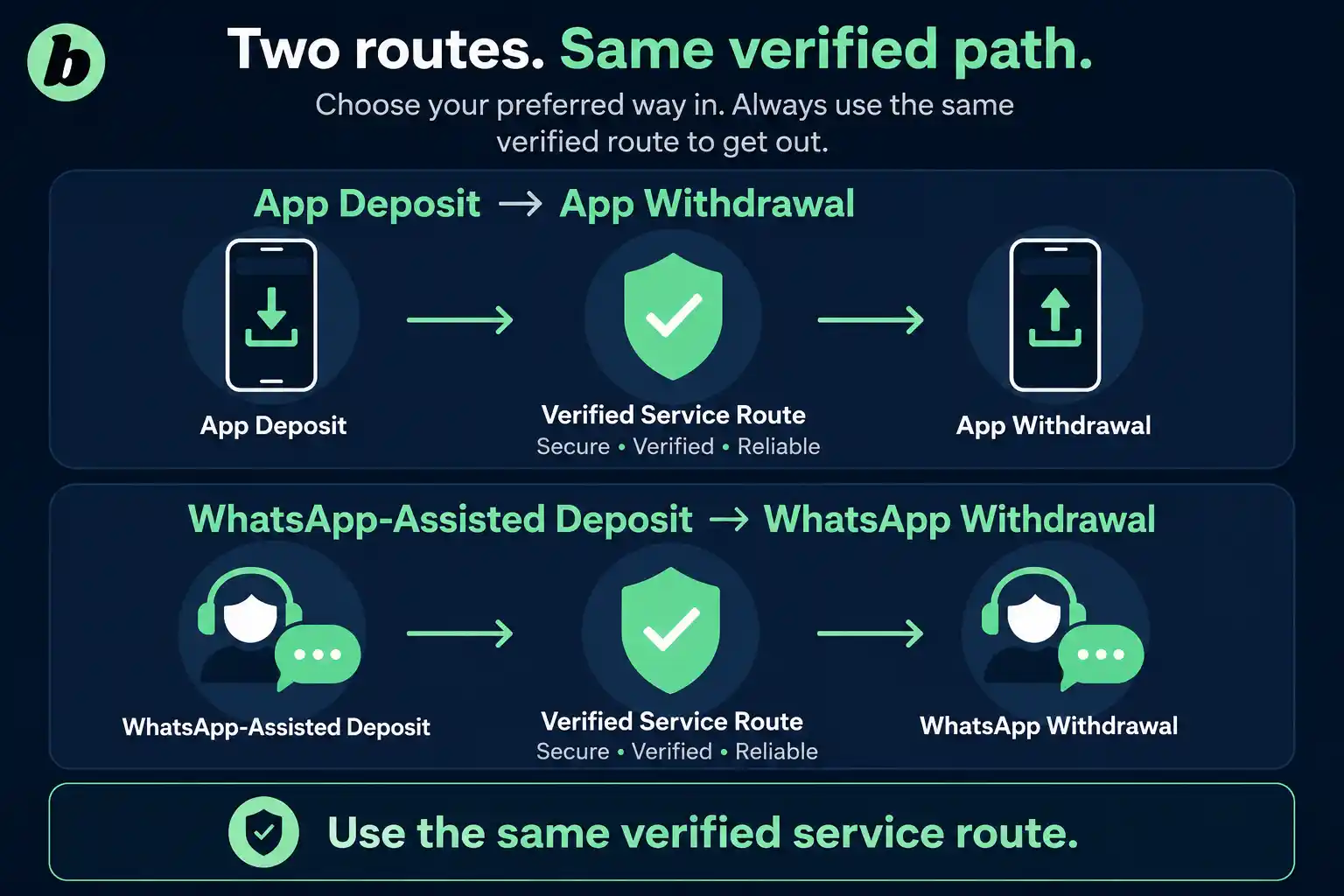
The phrase BPexch deposit withdrawal describes an important relationship between the two transactions. A deposit and a withdrawal are separate actions, but the service route should remain consistent. That means app deposit to app withdrawal, and WhatsApp-assisted deposit to WhatsApp-assisted withdrawal.
If you do not remember which route handled the earlier deposit, check your transaction history, app activity, or verified support conversation before submitting the request. Guessing the route can create unnecessary back-and-forth because the service team may need to determine where the original payment was recorded.
For deposit-specific instructions, including the current Rs. 500 deposit minimum and supported payment methods such as JazzCash, Easypaisa, UPaisa, NayaPay, SadaPay, and bank transfer, use the BPexch Deposit guide. This page keeps the focus on withdrawing rather than repeating the full funding process.
How Long Does a BPexch Withdrawal Take?
Under the current dealer workflow, correctly submitted BPexch withdrawal requests are commonly handled in around 3–5 minutes. This is a typical working timeframe, not a guaranteed deadline. A particular request can take longer when information must be checked, payment details do not match, the financial service is delayed, or another account-specific issue needs review.
Do not treat the 3–5 minute timeframe as a reason to send repeated requests. If the first request is still pending, keep the reference or conversation, wait for the current request to be checked, and use the same verified service route for an update.
A request that takes longer than usual does not automatically mean the money is lost or the account is blocked. Timing alone does not reveal the cause. The useful next step is to confirm the request details and ask the same verified route for the current status.
What If Your BPexch Withdrawal Is Delayed?
If a withdrawal request is taking longer than expected, first confirm that the request was actually submitted. Check the app status if you used the app, or review the verified WhatsApp conversation if you used assisted support. Make sure you did not leave a required field blank.
Next, check the withdrawal details. Confirm the username or ID name, registered number, amount, bank or wallet name, account-holder name, and account number. The account-holder name deserves special attention because a mismatch is the most common issue reported in the current dealer process.
If the information is correct, contact the same route that received the BPexch withdrawal request and ask for a status check. Provide the relevant account identifier and request details without sharing passwords, OTPs, wallet PINs, or unrelated sensitive information.
A delayed withdrawal request should not be “fixed” by submitting several new requests through different channels. Multiple requests can make the service history harder to follow. Keep one clear request active unless verified support specifically tells you that the original request failed and should be resubmitted.
BPexch Withdrawal Name Mismatch
A name mismatch is one of the first things to check when a withdrawal needs extra verification. The account-holder name entered in the withdrawal request should accurately identify the bank or wallet account that will receive the funds.
Common mismatch examples include a missing part of a name, a nickname instead of the registered account-holder name, a spelling difference, or a payment account belonging to another person. A mismatch does not tell you the final outcome by itself, but it can delay the request while support coordinates with the user.
If you discover a BPexch withdrawal name mismatch, do not send random variations of the name in repeated forms. Tell verified support what happened and provide the correct information requested for the current transaction. This creates a clearer record and reduces unnecessary confusion.
BPexch Withdrawal to JazzCash, Easypaisa, and Other Methods
The payment destination for a BPexch withdrawal can depend on the current service route and the supported method available for the account. Current dealer-service payment options can include JazzCash, Easypaisa, UPaisa, NayaPay, SadaPay, bank transfer, and other methods confirmed at the time of the request.
Do not assume that every BPexch withdrawal method is always available or that an old receiving or sending account remains permanent. Payment options can change. Follow the current app instructions or verified dealer support for the transaction you are making now.
JazzCash Withdrawal Details
If JazzCash is the current destination for your BPexch withdrawal, enter the wallet name, account-holder name, and account number accurately. Check the number before submitting. When the transaction completes, retain the wallet notification or transaction record privately in case you later need to confirm receipt.
Easypaisa Withdrawal Details
For an Easypaisa BPexch withdrawal, use the current verified service route and submit the accurate wallet details requested. Do not share the Easypaisa PIN, OTP, or password. A legitimate withdrawal request needs payment destination information, not control of your wallet.
Bank Transfer and Other Wallets
For bank transfer, UPaisa, NayaPay, SadaPay, or another supported method, confirm the current route and enter the account-holder information carefully. If the bank or wallet details have changed since your last transaction, update the withdrawal request instead of assuming the old details will be corrected automatically.
How to Verify BPexch Withdrawal Support
A BPexch withdrawal can involve sensitive account and payment information, so the support route should be verified before you share anything. Start from BetProRegistration.com or the current dealer app. For human assistance, use the support link published by the dealer website rather than a number discovered independently.
Be cautious when a contact claims they can speed up a BPexch withdrawal in exchange for your OTP, wallet PIN, password, banking login, or remote access to your phone. Those credentials are not normal withdrawal-form fields. Pakistan’s National CERT has warned that messaging-account hijacking campaigns commonly use impersonation and requests for verification codes.
State Bank of Pakistan guidance on digital-payment security also emphasizes transaction alerts and protection of customer credentials. Use your bank or wallet’s own transaction history and alerts to confirm whether funds were received. Do not rely only on a screenshot sent by another person.
What Proof Should You Keep After a BPexch Withdrawal?
Keep a simple private record of the BPexch withdrawal request until the transaction is completed. Useful details can include the withdrawal amount, date and time of the request, payment destination, support conversation or app status, and any transaction reference that appears when funds are sent.
If the BPexch withdrawal is completed, keep the receiving bank or wallet confirmation long enough to resolve any immediate discrepancy. If you share a screenshot with support, crop or redact unrelated balances, QR codes, full transaction history, or other private details that are not needed to identify the payment.
Do not alter a BPexch withdrawal receipt in a way that changes the amount, transaction status, date, or reference. Redaction should protect unrelated personal information, not change the evidence. A clean transaction record is more useful if a later support question appears.
Before Using a Different Bank or Wallet Account
If you want the funds sent to a bank or wallet account that is different from one you used previously, check the details before you submit the request. The receiving account-holder name, account number, and wallet or bank name should be accurate. Do not assume that support will automatically recognize a new payment destination from an old transaction history.
If the receiving account belongs to another person, do not hide that fact or alter the name to make it look like your own. Ask verified support what information is required for the current request. The service may need additional clarification, and that can take longer than a request where the account-holder information already matches.
Changing a payment destination is also a good reason to check the route again. An app-funded account still uses the app for the withdrawal request, while a WhatsApp-routed deposit still uses WhatsApp-assisted support. A new bank or wallet does not change the service-channel rule.
Before submitting, read the account number digit by digit and compare the account-holder name with the destination account. This short check can prevent a simple typo from becoming a longer support case. Check every detail before pressing the button. If you notice an error after sending the request, tell the same verified service route promptly instead of submitting a second form with different details.
Common BPexch Withdrawal Mistakes
Using the Wrong Service Route
The most avoidable BPexch withdrawal mistake is switching routes. An app-funded account should use the app withdrawal route. A WhatsApp-routed deposit should use the WhatsApp withdrawal route. Check the original deposit path before submitting.
Entering the Wrong Account-Holder Name
A BPexch withdrawal can require extra coordination when the account-holder name does not match the receiving bank or wallet. Copy the correct name from the payment account and check the spelling before submission.
Submitting an Amount Below the Current Minimum
The current minimum BPexch withdrawal is Rs. 500. Requests below the current minimum should be adjusted before submission. Confirm the live limit if the app or verified support displays an updated amount.
Sending Multiple Requests
Submitting several BPexch withdrawal requests because the first one has not completed can create a confusing record. Keep the original request active and ask the same verified route for a status update.
Sharing Passwords or OTPs
A withdrawal form may need payment destination details, but it does not require you to hand over control of your payment account. Keep passwords, OTPs, wallet PINs, banking passwords, email passwords, and remote-access codes private.
Assuming 3–5 Minutes Is Guaranteed
The current dealer workflow commonly handles correctly submitted BPexch withdrawal requests around 3–5 minutes, but exceptions happen. Verification or mismatches can take longer. Treat the timeframe as typical operating experience, not a guaranteed promise.
BPexch Withdrawal Safety Checklist
- Confirm whether your earlier deposit used the app or WhatsApp-assisted route.
- Use the same route for the BPexch withdrawal.
- Remember the current minimum withdrawal is Rs. 500.
- Check the username or ID name and registered number.
- Enter the withdrawal amount carefully.
- Confirm the bank or wallet name.
- Match the account-holder name to the receiving account.
- Double-check the account number before sending the request.
- Keep the request and transaction reference until completion.
- Never share passwords, OTPs, wallet PINs, banking passwords, or remote-access codes.
- Do not submit repeated requests while the first is being checked.
- Use only the verified dealer website, app, or support route.
- Review Responsible Gambling guidance and withdraw rather than chase losses when that supports your limits.
App vs WhatsApp BPexch Withdrawal
The app and WhatsApp routes both support BPexch withdrawal service, but they are not interchangeable for a particular transaction history. The correct route is determined by how the related deposit was handled. That continuity is more important than choosing whichever channel feels fastest at the moment.
The app can be convenient for users who prefer a self-service interface and already funded through the app. The trade-off is that users need the correct current app and should follow the live fields shown there. Unknown APK files or copied app links should be avoided.
WhatsApp-assisted BPexch withdrawal is useful for users whose deposit was coordinated through human dealer support. The benefit is direct communication when details need clarification. The trade-off is that users must verify the contact carefully because messaging platforms can also be used for impersonation scams.
Neither BPexch withdrawal route removes the need for accurate account-holder and payment details. Human support cannot make a mismatch disappear, and an app cannot correct information the user entered incorrectly. Check the request before submission regardless of route.
Next Steps
If you want to request a BPexch withdrawal now, first identify the route used for the related deposit. App deposit means app withdrawal. WhatsApp-assisted deposit means WhatsApp-assisted withdrawal. Then confirm the current minimum and prepare the payment details for the request.
For WhatsApp assistance, open authorized dealer WhatsApp support from BetProRegistration.com. Prepare your username or ID name, registered number, amount, bank or wallet name, account-holder name, and account number. Review the details once before sending.
If you deposited through the app, open the current BetProRegistration app and use its withdrawal route. If you cannot access the app because of an installation problem, use the BetProExch App Download guide. If your account itself cannot be accessed, use BetPro Login or BetPro ID Not Working.
If your BPexch withdrawal is already pending, do not create a duplicate request immediately. Check the account-holder information and other fields, keep your transaction record, and ask the same verified route for a status update.
Sources and Current Process Notes
This guide uses the current BetProRegistration authorized-dealer workflow documented for Pakistan in 2026: Rs. 500 current minimum withdrawal, app-to-app and WhatsApp-to-WhatsApp route continuity, the current WhatsApp withdrawal-form fields, 24/7 human dealer support, commonly observed 3–5 minute handling for correctly submitted requests, and account-holder-name mismatch as the most common withdrawal issue. Individual requests can take longer when additional checking is needed.
For digital-payment security context, see the State Bank of Pakistan guidance on security of digital payments. It requires regulated banks and microfinance banks to send transaction alerts and OTPs promptly for digital transactions, supporting the advice to check your own financial-service records when confirming receipt.
For messaging-security context, see the National CERT Pakistan WhatsApp account-hijacking advisory. It describes impersonation and verification-code theft, supporting the warning not to share OTPs with an unverified contact during a BPexch withdrawal conversation.
What is the minimum BPexch withdrawal in Pakistan?
The current minimum BPexch withdrawal is Rs. 500. Confirm the live limit through the verified app or dealer-support route if the service later displays a different current amount.
How long does a BPexch withdrawal take?
Correctly submitted BPexch withdrawal requests are commonly handled in around 3–5 minutes in the current dealer workflow. This is not guaranteed. Mismatched details, additional verification, payment-service delays, or account-specific issues can take longer.
Can I withdraw through WhatsApp if I deposited through the app?
No. Under the current service rule, an app deposit should be followed by an app withdrawal. A deposit routed through WhatsApp-assisted dealer support should be followed by a WhatsApp withdrawal request.
Conclusion
A BPexch withdrawal is easiest to manage when you keep the process consistent and the payment details accurate. Use the same verified route as the related deposit, meet the current Rs. 500 minimum, check the account-holder name carefully, keep the request record, and avoid duplicate submissions while a request is being reviewed. Use verified dealer support when you need help, protect your passwords and OTPs, and remember that betting involves financial risk.